
iPhone Screenshots

Description
Some videos should never leave the drive they live on. Secure Video Player is built for exactly that: plug a USB-C drive into your iPhone or iPad, review what's on it, unplug, and walk away. Nothing is imported, uploaded, or shared — because the app has no way to do any of those things.
BUILT FOR SENSITIVE FOOTAGE
Personal videos that are nobody's business. Legal and evidence review. Unreleased client work under NDA. Medical, research, and bodycam recordings. Security-camera exports. Ordinary players import, sync, and share by default — this one cannot.
PRIVATE BY ARCHITECTURE, NOT BY POLICY
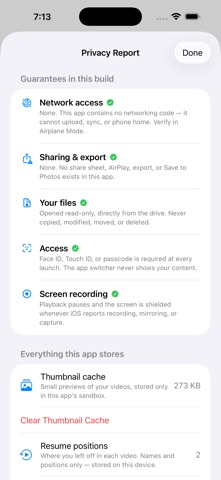
• No share sheet, no export, no AirPlay, no "Save to Photos" — sharing does not exist in this app
• Videos open read-only, straight from the drive. Unplug it and your footage leaves with it
• Face ID / Touch ID / passcode gate every launch; the app switcher shows a shield, never your content
• Playback pauses automatically if screen recording is detected
• Zero network code. No analytics, accounts, ads, or cloud. Verify it yourself: everything works identically in Airplane Mode
A PLAYER MADE FOR CAREFUL REVIEW
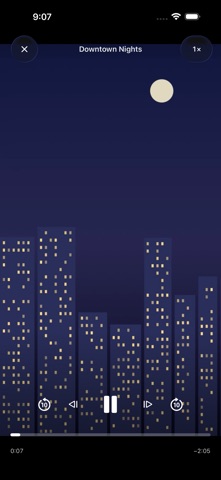
• Frame-by-frame stepping and 0.25x–5x speed with pitch-corrected audio — for scrutinizing footage, not just watching it
• Filmstrip scrubbing, pinch to zoom and pan during playback
• Swipe between videos, swipe down to dismiss; every video resumes where you left off
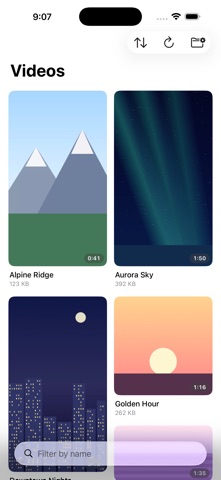
• A fast mosaic library with sort and instant search, organized by your drive's own folders
• A built-in Privacy Report shows every guarantee and everything the app stores — inspectable and erasable
HONEST LIMITS
iOS does not allow any app to block system screenshots. We tell you this because a privacy tool you can't trust to be straight with you isn't one.
Supports MP4, M4V, and MOV (H.264/HEVC) from USB-C drives and Files folders. External drives require a USB-C iPhone or iPad.
Your videos. Your drive. Nothing else.