
iPhone Screenshots


Description
Workout Roadbook turns your GPX file into a race plan you can take to Apple Watch.
BUILD YOUR RACE PLAN ON IPHONE
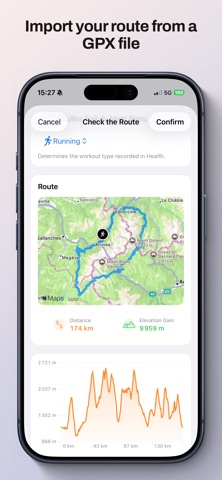
• Import and name a GPX file
• Review the route on the map and elevation profile
• Choose your activity: road running, trail running, hiking, or cycling
• Add cues at specific locations for nutrition, drinks, aid stations, equipment, hazards, or personal notes
• When supported, prepare one heart rate, pace, speed, power, or cadence alert for the Workout app
TAKE YOUR ROUTE TO YOUR WATCH
Import a GPX file, add cues, and configure the information or actions you want to receive during your activity.
On Apple Watch, install the selected route. Workout Roadbook follows your GPS progress and triggers the planned alerts at each cue.
Alerts can also be relayed to compatible smartwatches through iPhone notifications. Keep your iPhone with you and enable notification sharing in your watch companion app.
The app then opens the prepared session in Workout, which remains responsible for recording and metric alerts.
DESIGNED TO STAY SIMPLE
• Your plan remains available without your iPhone after installation on Apple Watch.
• Your GPX files and plans remain stored locally on your devices.
• No account, advertising, or remote server.
PRIVACY POLICY
https://neostudent.app/workout-roadbook#policy
TERMS OF USE
https://www.apple.com/legal/internet-services/itunes/dev/stdeula/