
iPhone Screenshots


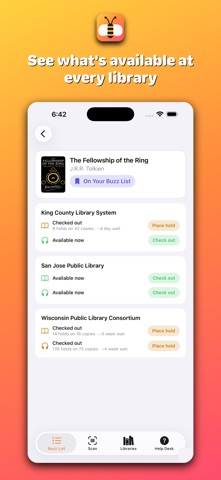
Description
See whether a book is available in your library's Libby/Overdrive collection — without leaving the page you're already on.
ShelfBee adds a small button to book pages on Amazon, Goodreads, TheStoryGraph, Barnes & Noble, Bookshop.org, Hardcover, and Book of the Month, showing whether that title is available to borrow right now from the libraries you care about, how many people are waiting, and roughly how long a hold would take. A companion app adds barcode scanning and a Buzz List for books you want to check on later.
HOW IT WORKS
1. Turn on the ShelfBee extension in Safari. The app walks you through it with a screenshot for every step.
2. Open the bee menu and search for your library by name. Add as many as you like.
3. Browse as usual. When you land on a book page, ShelfBee checks your libraries and shows you what it found.
WHAT YOU SEE
• Available now — ready to borrow immediately
• On hold — with the number of people waiting and an estimated wait
• Not available — so you can stop wondering
Results are grouped by library and split by format, so you can tell at a glance which of your libraries has the ebook and which has the audiobook.
BUZZ LIST & SCANNING
Save a title to your Buzz List right from the button on any book page, then check back anytime to see if it's become available. On iPhone and iPad, the app can also scan a book's barcode to look it up on the spot — handy in a bookstore or browsing your own shelves.
FEATURES
• Works on Amazon (21 storefronts), Goodreads, TheStoryGraph, Barnes & Noble, Bookshop.org, Hardcover, and Book of the Month
• Add as many libraries as you like — public, county, consortium, or university
• Reorder your libraries so the one you borrow from most sits at the top
• Filter by ebook or audiobook
• Save books to a Buzz List and revisit them anytime
• Scan a barcode to look up a book on iPhone and iPad
• Your library list and Buzz List sync across iPhone, iPad, and Mac through iCloud
• Setup Guide and Troubleshooting built into the app
NO ACCOUNT NEEDED
No sign-up, no library card, no sign-in — not even for setup. ShelfBee reads public availability data, the same catalog information Libby shows, and never asks who you are.
ONE-TIME PURCHASE
Buy ShelfBee once and it's yours. No subscription, no in-app purchases, no ads, and nothing to unlock later.
PRIVACY
ShelfBee collects nothing. Your library choices and Buzz List live on your device and in your own iCloud account. Availability lookups go straight to OverDrive's public API, and scanned or searched books are looked up via Open Library and Google Books for title, author, and cover art — none of it linked to you. There's no ShelfBee server, no analytics, and no tracking of any kind.
Questions or ideas: [email protected]
ShelfBee is an independent app and is not affiliated with, endorsed by, or sponsored by OverDrive, Libby, Amazon, Goodreads, TheStoryGraph, Barnes &
Noble, Bookshop.org, Hardcover, or Book of the Month.