
iPhone Screenshots



Description
Preview3D is a fast, native iPhone and iPad viewer for the 3D formats you actually use — from CAD to mesh to 3D printing — in one clean window.
Open a STEP file from a vendor, a painted 3MF from your slicer, or an STL someone sent you, and see it instantly — in the app, or right in the Files app with Quick Look and 3D thumbnails. No web uploads, no account, no clutter.
SUPPORTED FORMATS
• STEP / STP, STL, OBJ, PLY
• glTF / GLB, USDZ / USD, COLLADA (DAE)
• 3MF — including painted multi-material prints
• FBX, 3DS, X3D, LWO, MS3D, AC, AMF, OFF and more (via Assimp)
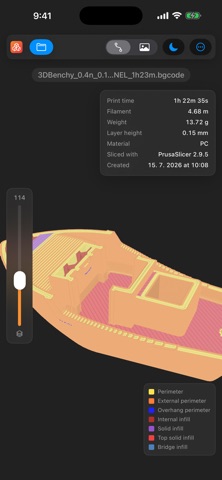
• G-code and PrusaSlicer binary G-code (.bgcode)
REAL STEP SUPPORT
Preview3D reads STEP with a pure-Swift B-rep kernel: watertight tessellation and crease-aware normals straight from the exact geometry, so cylinders stay smooth and edges stay crisp. Files that carry colors (STYLED_ITEM) render each part in its assigned color.
INSPECT
Open the info panel for bounding-box dimensions, volume, surface area, watertightness and structure — solids, faces, edges, triangles and vertices.
3D-PRINTING FILES
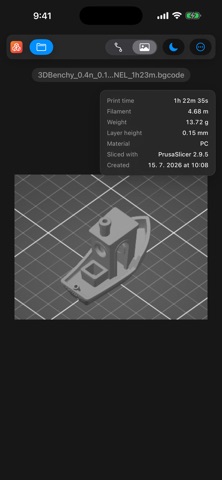
Open your slicer's G-code or PrusaSlicer .bgcode, orbit the print toolpath in 3D, flip to the embedded preview image, and read the print stats — time, filament, weight, layer height and material.
3MF, IN FULL COLOR
Multi-material painting from PrusaSlicer and Bambu Studio is decoded and rendered in its filament colors — including fine sub-facet brush detail — so you can preview a finished multi-color print before it leaves the slicer. Colors written into a 3MF by CAD tools and converters show too.
SEE IT IN YOUR ROOM
View any model in AR with AR Quick Look — place it on your desk or the floor and walk around it.
SCAN A CODE, SEE THE MODEL
A Preview3D QR code next to a printed model opens it in 3D and AR — even for someone who hasn't installed the app, through an App Clip. Make codes for your own Printables models, free, at preview3d.xfanta.com/qr.
QUICK LOOK & THUMBNAILS
Preview supported files right in the Files app, and get real 3D thumbnails — including STEP, painted 3MF, COLLADA (DAE), FBX and 3DS that iOS can't render on its own. Keep your models in the Preview3D folder in Files and reopen them anytime.
SHARE
Send a PNG snapshot of the current view to any app. Placing a model in AR? Share it as USDZ right from there.
BUILT FOR IPHONE AND IPAD
A real native app built on SceneKit and Metal — quick to launch, quick to orbit. Fully offline: everything runs on your device, no account, no network. iOS and iPadOS 17 or later.
BUY ONCE, USE EVERYWHERE
Preview3D is a universal purchase: one purchase covers the iPhone, iPad and Mac apps. The Mac version adds PMI / GD&T (AP242) reading, assembly trees with per-part isolation, and one-click conversion to STL, OBJ, GLB and USDZ.
Note: measurements are produced by automated tessellation and are provided for convenience — always verify against your authoritative CAD source for manufacturing-critical work.