
iPhone Screenshots


Description
TaskFlow Studio: because your to-do list was getting a little too confident.
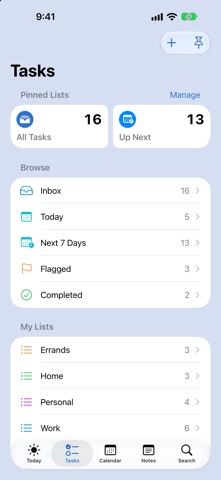
Your tasks, calendar, and notes finally agreed to sit at the same table. TaskFlow Studio is built on Apple Reminders and Calendar, so everything stays in sync with the apps you already use, and it adds the planning tools those apps leave out.
It looks and feels like it belongs on your iPhone and iPad, because it does. Standard iOS lists, familiar gestures, and no learning curve. Productivity apps should help you do the work, not become the work.
PLAN YOUR DAY
• Today brings together overdue tasks, today's tasks, your calendar, and tomorrow
• Suggested surfaces flagged and high-priority work. Swipe right to commit it to today.
• Swipe left on overdue tasks to move them to tomorrow, for when today has other plans
CAPTURE AND EDIT FAST
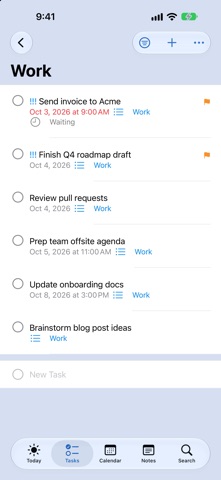
• Add tasks inline at the bottom of any list, then keep typing
• Tap a task to edit it in place. Changes save automatically.
• Quick Capture turns "call the dentist Friday at 9" into a task or event
• Shake to undo when your thumb gets ahead of your brain
ORGANIZE YOUR WAY
• Lists, smart lists, pinned lists, flags, priorities, and tags
• Subtasks, dependencies, comments, notes, attachments, and location alerts
• Show any list as rows or columns
• Filter and sort by status, priority, due date, or tag
TASKS AND CALENDAR, TOGETHER
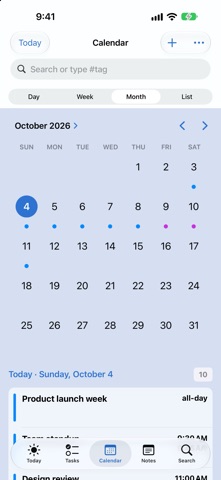
• Day, Week, Month, and List views show your events and due tasks side by side
• Create and edit events with Apple's own Calendar editor
• Tag events and see everything due on any day at a glance
FIND ANYTHING
• Search tasks, notes, events, comments, and tags
• Type # to jump straight to a tag
NOTES
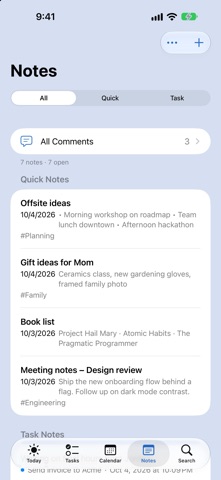
• Quick notes for ideas, checklists, and drawings, with tags
• Every task comment in one place
AT HOME ON YOUR DEVICE
• Home Screen widgets for Today, Up Next, Agenda, High Priority, and smart lists. Complete tasks right from the widget.
• Quick Capture in Control Center, on the Lock Screen, or on the Action button
• Optional Live Activity with today's tasks on the Lock Screen
• Focus filters show only the lists that matter right now
• Siri and Shortcuts support for adding, completing, and finding reminders
• A full iPad layout with a sidebar, drag and drop, and side-by-side details
GREAT FOR
Daily planners, Reminders power users, calendar-driven work, and anyone juggling home, health, family, and work lists. Also people who love tags a normal amount.
TaskFlow Studio helps your tasks go from "I should remember that" to "handled."
Finally. Mostly. Tomorrow also exists.