
iPhone Screenshots


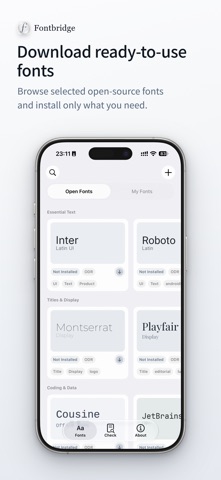

Description
Bring your fonts to iPhone and iPad.
Fontbridge makes it easy to import, install, check, and manage your own fonts on iOS and iPadOS.
Import TTF, OTF, TTC, and ZIP files, install fonts on your device, and use them in compatible apps such as Pages, Keynote, Numbers, Word, PowerPoint, Excel, and more.
Fontbridge can also check documents for missing fonts, so you can quickly see which fonts a file uses, which ones are already available on your device, and which supported missing fonts can be installed.
Key Features
・Import multiple TTF, OTF, and TTC font files
・Import ZIP archives and skip fonts you already have
・Create and install font profiles on iPhone and iPad
・Manage your imported fonts in one place
・Check documents for missing fonts
・Install multiple available missing fonts at once
・Browse selected open-source fonts
・Works on iPhone and iPad
・No account required
・No subscription required
Fontbridge is useful for documents, presentations, multilingual typography, course materials, contracts, resumes, and other files where the correct fonts matter.
It works especially well when moving files between devices or when you need to make sure a document has the fonts it was designed to use.
A simple font utility, not a font marketplace.
Fontbridge does not replace the iPhone or iPad system interface font and cannot force apps to use custom fonts. Installed fonts are available to apps that support system-installed fonts or custom font selection.
Font availability depends on iOS, iPadOS, and each app’s own font support. Some apps may need to be restarted before newly installed fonts appear.