
iPhone Screenshots




Description
TablePro is a native database client for iPhone and iPad. Browse tables, run queries and edit rows, using the same connections you use in TablePro on the Mac.
DATABASES
- MySQL and MariaDB
- PostgreSQL
- Microsoft SQL Server
- Oracle
- Redis
- SQLite and DuckDB files on your device
- TiDB and OceanBase
- Amazon Redshift connections synced from the Mac
BROWSE
- Search tables and page through rows, 50 to 500 at a time
- Sort by any column, search text columns, and stack filters with AND or OR
- Tap a foreign key to preview the row it points to
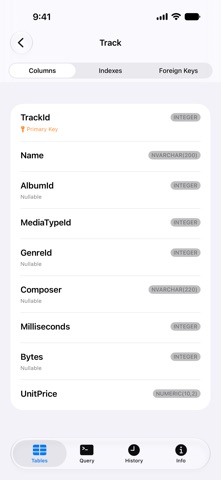
- See the columns, indexes and foreign keys of any table
EDIT
- Open a row full screen, change values, set NULL and save
- Insert and delete rows, truncate or drop a table
- Every save, insert and delete runs in a transaction
- Safe mode for each connection: Off, Confirm Writes or Read-Only
QUERY
- SQL editor with syntax highlighting
- Stop a query while it runs
- Copy or export results as JSON, CSV or SQL INSERT statements
- Query history for each connection
- Follow a running query in a Live Activity on the Lock Screen and in the Dynamic Island
CONNECT SECURELY
- SSH tunnels with a password or a private key, with host key checks
- SSL with CA and client certificates
- Passwords and private keys kept in the Keychain
- Lock the app with Face ID, Touch ID or Optic ID
WORKS WITH YOUR MAC
- iCloud sync of connections, groups and tags with TablePro for Mac, off until you turn it on
- Password sync through iCloud Keychain, off by default
- Continue an open connection on another device with Handoff
- Import connections from a .tablepro file through Files or AirDrop
ORGANIZE
- Favorites, recent connections, groups and tags
- A Quick Connect widget for your Home Screen
- Shortcuts and Siri actions to open a connection or add rows to a table
TRY IT FIRST
Open the built-in Chinook sample database to browse, query and edit without setting up a server.
PRIVACY
Usage data is off unless you turn it on, and it never includes hostnames, usernames, passwords, queries or data.