
iPhone Screenshots



Description
Claude Code, Codex, and Copilot CLI keep running on your host after you close the app. No disconnects, even without Mosh.
SSH Term is a terminal app for connecting to servers over SSH and driving AI coding agents from your iPhone and iPad. No subscription (one-time purchase): every feature is included in the price, and the only in-app purchase is an optional way to support development. No account. No telemetry.
KEEPS RUNNING AFTER YOU CLOSE THE APP
- Agents of supported harnesses started in a terminal on your PC keep running on the host after you close that terminal, so you can pick them up on your iPhone (prepare the host once in the app)
- Agents on your hosts appear in the connection list with their state (Working / Waiting for input / Needs approval). Tap one to reply or approve in the chat view
- When an agent needs approval, waits for input, or finishes a turn, get a push notification on your iPhone through the free ntfy app, even while SSH Term is closed
SUPPORTED HARNESSES
The agent list, notifications, and chat view work with Claude Code, Codex, Oh My Pi, Pi, and Copilot CLI.
NO DISCONNECTS, EVEN WITHOUT MOSH
- Turn on "Keep the shell on the host" and the shell keeps running on the host. Switching between Wi-Fi and mobile data or locking the screen won't stop your work
- On reconnect, the tab reattaches to the same shell and shows the output you missed
- No tmux needed. On first connection the app installs a small helper, stagent, on the host (sha256 verified). Linux, macOS, and Windows hosts are supported
TYPE IN YOUR OWN LANGUAGE
- IME mode: compose Japanese, Korean, or Chinese text in the input box first, then send it to the terminal in one go
ON THE BIG SCREEN OF AN IPAD OR AN OPEN IPHONE DUO
- Keep Claude Code running with logs or files right next to it.
- Two tabs side by side: answer approval prompts while following the server log
- Home: your connections next to each host's agent cards
- Sidebar of open tabs, those waiting for approval first, with their last lines
- Filer: file list and preview side by side
- With a hardware keyboard, type just like on a PC. The keys band steps aside for more screen, and "Keys" at the bottom right brings it back
- Open iPhone Duo: two terminals stacked, instruct in one, check results in the other
- Split View works too: the layout follows the window width.
FOR DEVELOPERS WORKING FROM THEIR PHONE
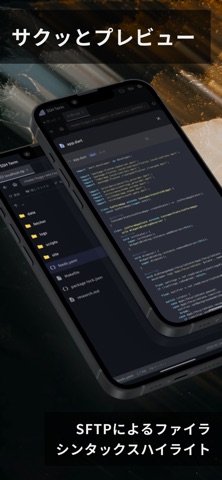
- SFTP file manager: browse, upload, download, rename, and delete remote files, with syntax-highlighted code preview
- Generate Ed25519 / RSA keys in the app and copy the public key with one tap
- Connect to multiple servers at once in tabs
- Input assist toolbar: Esc, Tab, Ctrl, arrow keys, F1–F12, plus your own custom keys and commands
- GitHub: view Issues and Pull Requests for the repository the terminal is in
- Host key fingerprint verification on first connection, with a warning if the key changes
- Password, public key, and keyboard-interactive authentication
PRIVACY AND SECURITY
- No subscription, one-time purchase
- No account, no analytics, no cloud sync
- Passwords and keys stored encrypted on your device
- Lock the app with a PIN, Face ID, or Touch ID