
iPhone Screenshots




Description
GitSync.md is a Git client for iPhone and iPad. Keep Markdown notes and code in real Git repositories, edit your files, then review, commit, and push your changes.
NOTES AND CODE, IN YOUR OWN FILES
Use the built-in editor, or open repository files in Obsidian, iA Writer, 1Writer, Taio, or another compatible iOS Files app. Your notes stay ordinary files in a real Git working copy.
GITHUB AND YOUR OWN GIT REMOTE
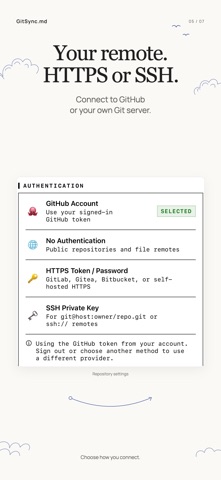
Sign in to GitHub with OAuth or a Personal Access Token. You can also connect to GitLab, Bitbucket, Gitea, or a self-hosted Git remote over HTTPS or SSH using the credentials that remote requires.
REVIEW BEFORE YOU PUSH
See changed files and text diffs, stage your changes, write a commit message, and push to your remote. Browse commit history, manage branches, stash changes, and use Pull with Rebase. Review and resolve merge conflicts when they occur.
START WITH A REPO OR A LOCAL FOLDER
Clone a repository, open an existing local Git repository, or turn a supported folder on your iPhone or iPad into a Git repository. Publishing a local folder creates a new private GitHub repository as a separate action, so you can review your files before uploading them.
SHORTCUTS FOR YOUR WORKFLOW
Run Pull, Push, or Sync from Apple Shortcuts. Use syncmd:// callback links to trigger repository actions from compatible apps and notes. Synchronization is driven by these actions; this build does not offer automatic background sync.
MULTIPLE REPOSITORIES
Keep your notes, documentation, and code projects in separate repositories, each with its own branch, author details, and storage location.
STANDARD GIT, DIRECT CONNECTIONS
GitSync.md uses libgit2 for on-device Git operations. Your repositories have real .git directories, and Git traffic goes directly to your chosen remote. Git credentials are stored in the iOS Keychain.
Terms of Use (EULA): https://gitsyncmd.app/terms