
iPhone Screenshots


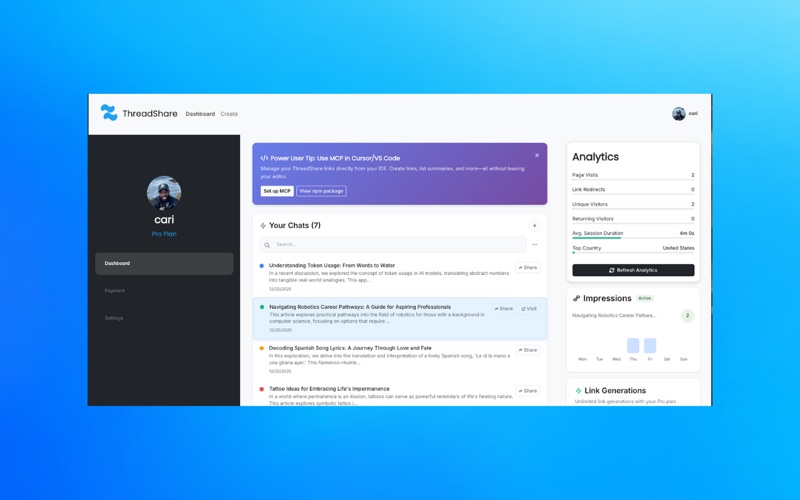
Description
ThreadShare: Turn AI Conversations Into Collaborative Knowledge Bases
Transform your ChatGPT, Claude, and Gemini conversations into powerful, shareable knowledge bases with access control, comments, and analytics—all from Safari.
**Core Features:**
**Access Control & Privacy**
Your conversations are secure. You control who sees what with granular access control. Set permissions, share with specific people, or keep conversations completely private. All data is encrypted and protected.
**Comments & Collaboration**
Add comments to specific parts of conversations to discuss insights, ask questions, and collaborate with your team. Turn AI conversations into interactive knowledge bases where your team can engage, learn, and build on ideas together.
**Analytics & Engagement Tracking**
Track how your shared conversations perform with detailed analytics. See page visits, unique visitors, engagement metrics, and more. Understand what resonates with your audience and optimize your shared knowledge.
**Professional Pages, Automatically**
ThreadShare handles the heavy lifting, creating clean, professional-looking pages automatically from your AI chats. No manual copying, pasting, or formatting required. One click saves, one link shares.
**How It Works:**
1. Install ThreadShare from the App Store
2. Sign in with your Google account or email
3. Browse ChatGPT, Claude, or Gemini as usual
4. Click the ThreadShare extension icon when you want to save a conversation
5. Your conversation is instantly saved as a clean, professional page
6. Control access, add comments, and track engagement
**Perfect For:**
• **Teams**: Share AI-generated insights and research with controlled access
• **Developers**: Document solutions and code explanations with collaborative comments
• **Knowledge Workers**: Build searchable knowledge bases from AI interactions
• **Content Creators**: Organize inspiration and ideas with engagement tracking
• **Students**: Create study materials with collaborative note-taking