
iPhone Screenshots

Description
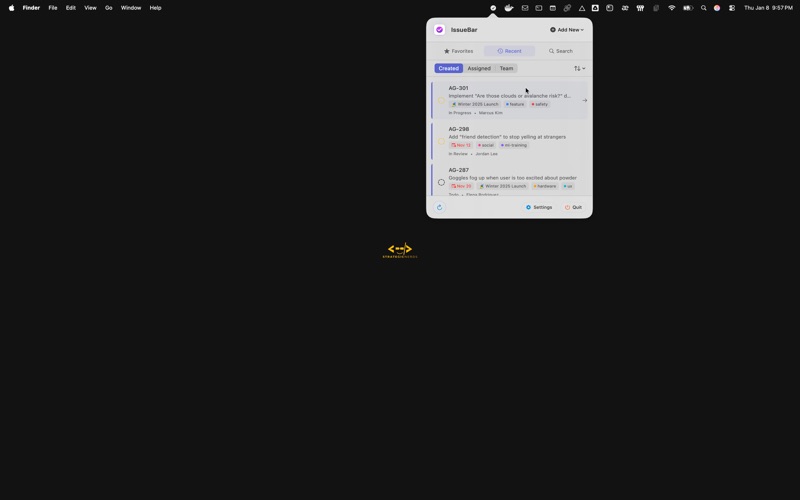
IssueBar gives you instant access to your work items without disrupting your flow.
FEATURES
Quick Access
Open IssueBar from your menu bar with a single click. View your favorites, recent issues, and projects without opening a browser tab.
Multiple Views
- Favorites: Your starred issues, projects, and initiatives at your fingertips
- Recent: Recently updated items sorted by activity
- Search: Find any issue or project across your workspace instantly
Multiple Account Support
Switch between different Linear workspaces seamlessly. Perfect for freelancers and team members working across multiple organizations.
Smart Filtering
- Show or hide completed items
- Filter out canceled issues
- Sort by creation date or last update
- Customize your view to match your workflow
iCloud Sync
Your preferences sync automatically across all your Macs via iCloud. Set it once, use it everywhere.
Security & Privacy
- Secure OAuth authentication
- Credentials stored safely in macOS Keychain
- No data collected or shared
- Open source for complete transparency
Native macOS Experience
Built natively for macOS with SwiftUI for a fast, responsive experience that feels right at home on your Mac.
PERFECT FOR
- Product managers tracking multiple initiatives
- Engineers managing sprint tasks
- Designers reviewing feedback
- Team leads monitoring project progress
- Anyone who wants faster access to Linear
GET STARTED
1. Connect your Linear account with secure OAuth
2. Choose your default view and preferences
3. Access your work from the menu bar anytime
IssueBar respects your focus. No notifications, no interruptions - just quick access when you need it.
IssueBar is not in any way affiliated with Linear, the company. It's just a fan app by a loyal fan.