
iPhone Screenshots
Description
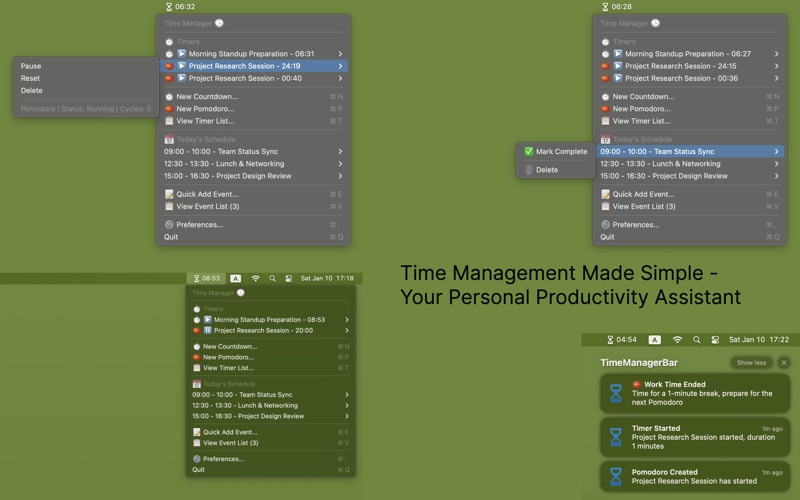
This is a macOS menu bar time management tool that integrates timer, Pomodoro, and schedule event management functions, allowing you to efficiently manage your time without leaving your current work environment.
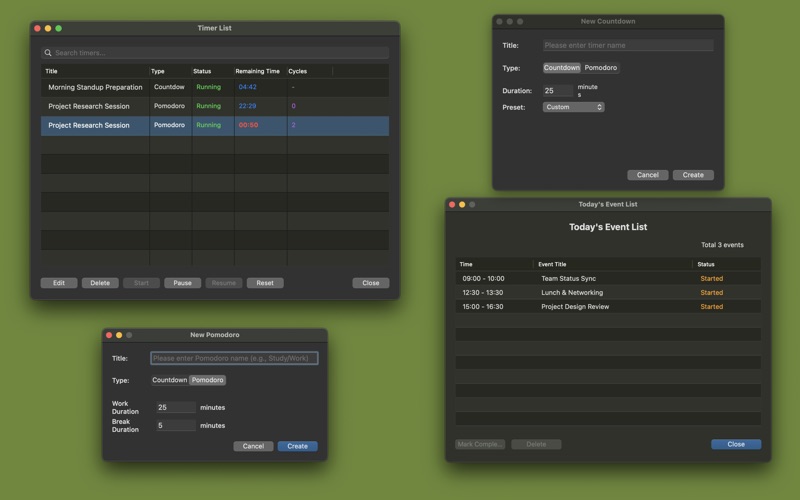
It supports two modes: countdown and Pomodoro.
You can create multiple timers to run simultaneously, customize work durations and break intervals. All timers are displayed in real-time in the status bar menu, and notifications with sounds will alert you upon completion.
It also includes a lightweight today's schedule function, enabling you to quickly add today's events, set reminders, and view today's arrangements intuitively in the menu.
Events support marking as completed, and ongoing events are automatically highlighted.
All data is saved locally, and it supports customizable preferences such as notification sounds (15 system sound effects) and time format (12-hour/24-hour).
The app is fully integrated into the macOS menu bar, and all functions can be accessed by clicking the icon. It is a focused, efficient, and distraction-free time management assistant.
Timer types:
Countdown timer: Customizable duration (1 minute to 24 hours)
Pomodoro timer: Work/break cycles with customizable work and break times
Timer operations:
Start/Pause/Resume/Stop/Reset
Automatic notifications (start, pause, completion)
Support for running multiple timers simultaneously
The status bar displays the next timer about to expire