
iPhone Screenshots



Description
SuperTables - Select Web Tables Like Excel
Tired of struggling to copy table data from websites? SuperTables brings Excel-like table selection to your browser, making it easy to select, copy, and analyze table data on any webpage.
KEY FEATURES
Flexible Selection
- Cell selection: Cmd/Ctrl + Click to select individual cells
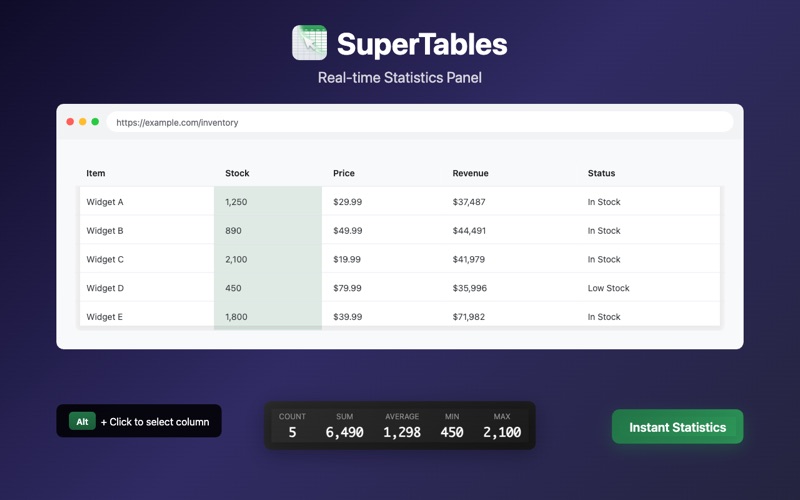
- Column selection: Alt + Click to select entire columns
- Row selection: Cmd/Ctrl + Alt + Click to select entire rows
- Multi-select: Hold modifier keys and click to select multiple non-adjacent areas
- Range selection: Click start cell, then Shift + Click end cell
Smart Statistics
When you select data, a statistics panel automatically appears:
- Numeric mode: Shows Count, Sum, Average, Min, Max
- Text mode: Shows Top 5 most frequent values with counts
- Toggle: Click the switch button to change modes
One-Click Copy
- Press Cmd/Ctrl + C to copy selected data
- Maintains table format - paste directly into Excel
- Click any value in the stats panel to copy it
Excel Export
- Select entire table to reveal Download Excel button
- One-click export to .xlsx format
USE CASES
- Data Analysts: Quickly extract web data to Excel for analysis
- Researchers: Copy table data from online reports and papers
- Finance Professionals: Aggregate financial data from web pages
- Students: Collect data tables from online courses and research
- Anyone who works with web tables
PRIVACY FIRST
- No user data collection
- No external server connections
- All processing happens locally
- Open source and transparent
CUSTOMIZATION
- Fully customizable keyboard shortcuts
- Adjustable stats panel position (left/center/right)
- Supports English, Chinese, and Japanese
Install now and make working with web tables simple and efficient!