
iPhone Screenshots

Description
ioshot is a lightweight yet powerful screenshot utility designed specifically for macOS. Capture any part of your screen, annotate with professional tools, and share instantly. Perfect for documentation, tutorials, bug reports, and everyday communication.
**CAPTURE MODES**
- Full Screen: Capture your entire display with one click
- Region Selection: Draw to capture any area with pixel-perfect precision
- Window Capture: Click any window to capture it instantly
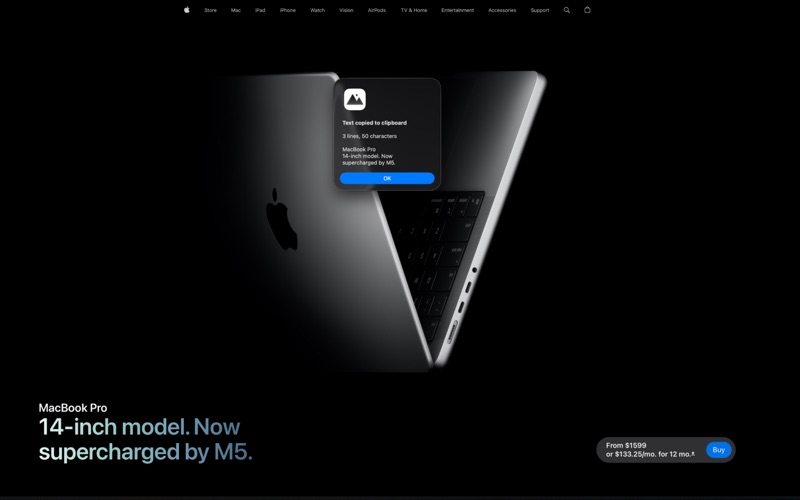
- OCR Text Recognition: Extract text from any screen region and copy to clipboard
**ANNOTATION TOOLS**
Built-in editor with professional annotation capabilities:
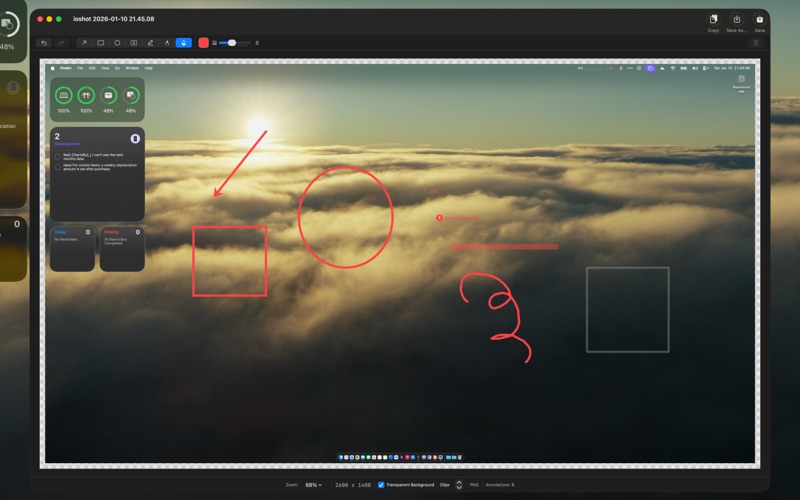
- Arrow: Point to important elements
- Rectangle & Oval: Highlight and frame content
- Pen: Freehand drawing for signatures and marks
- Highlighter: Semi-transparent marking
- Blur: Hide sensitive information
- Text with Numbers: Add labels with automatic numbering
**SMART FEATURES**
- Global Hotkeys: Capture from anywhere with customizable keyboard shortcuts
- Multi-Monitor Support: Works seamlessly across all connected displays
- Retina Support: High-resolution captures at native display quality
- Transparent Padding: Add professional margins around your screenshots
- Multiple Formats: Save as PNG, JPG, TIFF, or GIF
- Instant Clipboard: Copy captures directly to clipboard for quick sharing
- Thumbnail Preview: Visual notification after each capture
- Launch at Login: Always ready when you need it
**WORKFLOW OPTIONS**
After capture, choose to:
- Open in Editor for annotations
- Copy directly to clipboard
- Save to your preferred location
**MULTILINGUAL OCR**
Extract text from screenshots in:
- English, Korean, Japanese
- Chinese (Simplified & Traditional)
- German, French, Spanish, Italian, Portuguese
ioshot lives in your menu bar, ready to capture at a moment's notice without cluttering your Dock.