
iPhone Screenshots


Description
**What is SqueezeBar?**
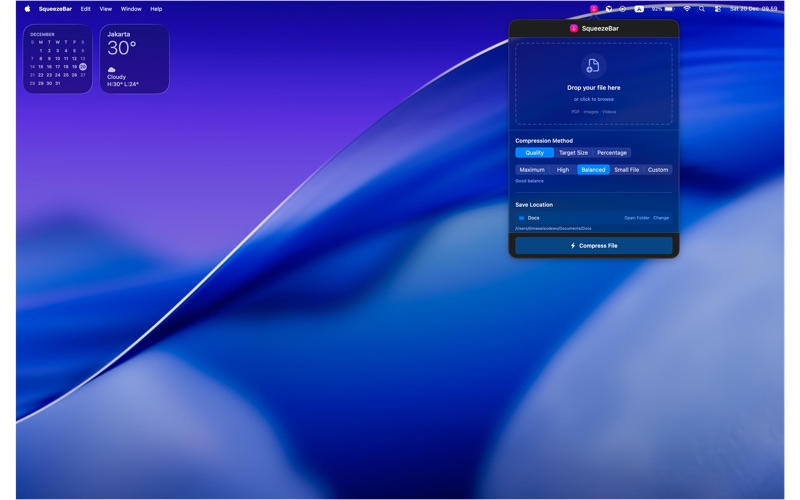
SqueezeBar is a simple tool that makes your files smaller. It sits in your Mac's menu bar, always ready when you need it. Just drag and drop any file, and SqueezeBar will compress it for you.
**Why use SqueezeBar?**
• No internet needed - Everything works on your Mac
• Fast compression - Get results in seconds
• Private and safe - Your files never leave your computer
• Easy to use - Just drag, drop, and done
• Always available - Lives in your menu bar
**Supported File Types:**
• Images: JPEG, PNG, HEIC, BMP, TIFF
• Videos: MP4, MOV, QuickTime
• Documents: PDF files
**Three Easy Ways to Compress:**
1. Quality Mode - Choose how good the file should look (0-100%)
2. Target Size - Tell SqueezeBar how small you want the file (example: 5MB)
3. Percentage Mode - Make it smaller by a certain amount (example: 50% smaller)
**100% Private:**
All compression happens on your Mac. No file is sent to the internet. No account needed. No data collection. Your files stay yours.
**Built for Mac:**
Made with Apple's native technology for best performance. Uses your Mac's hardware to compress files faster. Designed to feel like a natural part of macOS.
Stop using slow websites that need internet and see your private files. Get SqueezeBar and compress files the easy way - right from your menu bar.