
iPhone Screenshots



Description
Scriptease Studio is a professional offline filmmaking suite for Mac. Write screenplays, plan scenes, design shots, and export production documents — with a one-time purchase. No account. No cloud. No tracking.
Built for film students and indie filmmakers who want a complete toolkit without subscriptions, Scriptease keeps your projects local and private. Work anywhere, even with zero internet.
Screenwriting (Industry-Standard Workflow)
Write and edit screenplays in a dedicated script editor designed for fast drafting and clean screenplay formatting. Stay focused, move quickly between scenes, and keep your writing workflow in the same place as your planning tools.
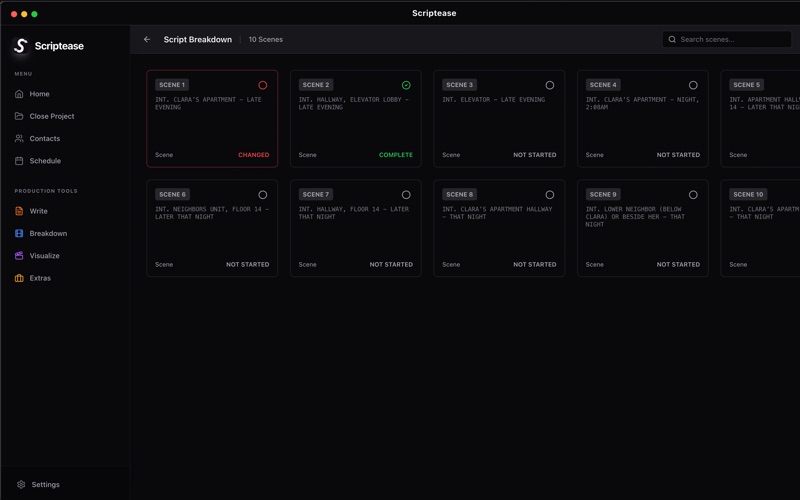
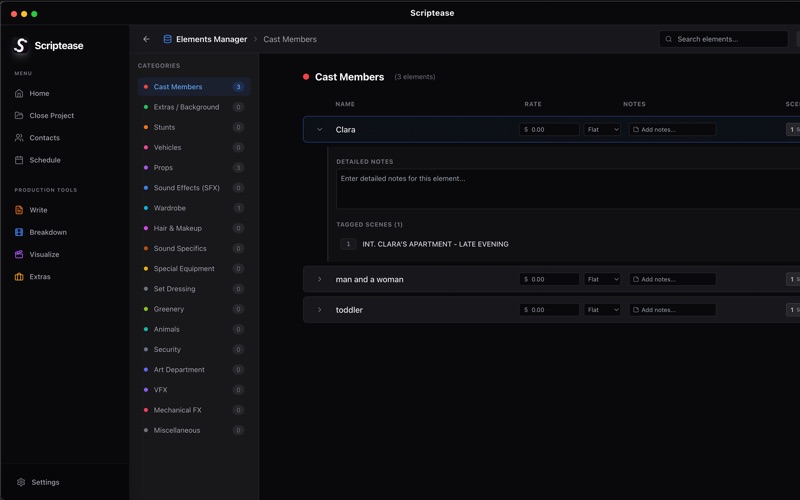
Script Breakdown (Pre-Production Ready)
Break down your screenplay into production elements and organize what each scene needs. Use breakdown tools to support planning and prep, then turn that work into production-ready documents.
Storyboards & Shot Design
Visualize scenes before you shoot. Build storyboards and plan your shots with a shot design workflow that supports blocking and coverage planning. Go from a script page to a clear visual plan without switching tools.
Stripboard & Scheduling
Plan shoot days and organize scenes for production. Use stripboard-style scheduling to structure your shoot plan and keep everything aligned with your script and breakdown.
Call Sheets & Production Documents
Create and export the key documents you need for set. Scriptease is designed to help you keep your workflow organized from script to shoot day.
Export & Deliverables
Export your work into clean, shareable documents for collaborators and production use. Keep a consistent workflow from writing to planning to export.
Why Scriptease Studio
• One-time purchase (lifetime access)
• Fully offline workflow
• No account required
• No subscriptions
• No tracking or data collection
• Projects stay on your Mac
Scriptease Studio is an all-in-one alternative to paying for multiple filmmaking tools. Write, plan, and prep your next project in one offline app — then take it to set.