
iPhone Screenshots
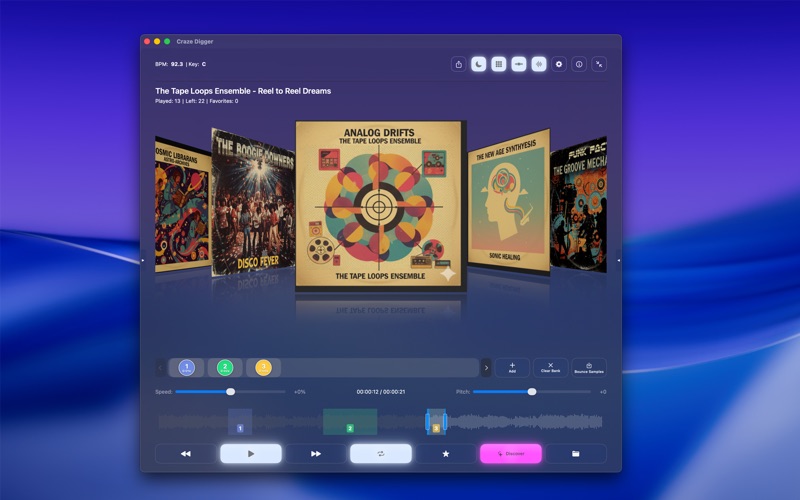


Description
Craze Digger is a creative media player for macOS — built for musicians, producers, DJs, and video creators who want to organize their media and turn it into inspiration.
Systematically listen through large audio and video libraries, mark interesting moments, create precise loops, and save ideas directly inside your files. Craze Digger works like a digital sketchbook: fast browsing, focused listening, and instant idea capture.
Use the Nano Player for quick digging, the standard editor for detailed loop and sample work, or switch to immersive fullscreen video mode. Automatic BPM and key detection, waveform visualization, pitch and tempo control help you evaluate material in seconds.
With sample banks, favorites, smart playlists, and export tools, Craze Digger turns raw content into a structured, searchable source of ideas — perfect for sample digging, music production, and video work.
Key Features:
- Audio & video playback (MP4, MOV, MP3, WAV, AIFF, more)
- Audio Separation / Stemming Feature (Vocals, Drums, Bass, Others)
- Precise looping & 5 sample banks (loops saved automatically)
- BPM & key detection
- Pitch & tempo control
- Waveform & spectral visualization
- Favorites & smart playlists
- Nano Player, editor mode & fullscreen video
- Optimized for large libraries on macOS
Craze Digger helps you listen smarter, stay organized, and turn media into ideas.
Feature-List:
MEDIA PLAYBACK & MANAGEMENT
- Audio & video playback (MP4, MOV, MP3, WAV…)
- Automatic folder scan & indexing
- Smart playlists with database support
- Optimized for large media libraries
- Automatic metadata extraction
LOOP & SAMPLING
- Precise loops with start/end markers
- 5 sample banks (auto-saved per file)
- Seamless looping
- Waveform-based loop positioning
AUDIO MANIPULATION & ANALYSIS
- Pitch shifting & tempo control
- Real-time audio engine
- BPM & key detection (cached)
- BPM & key display during playback
WAVEFORM VISUALIZATION
- Standard, Spectral & Custom modes
- Zoom & frequency color coding
FAVORITES & PLAYLISTS
- Finder-tag-based favorites
- Played status & statistics
- New / Favorites modes
- Search, random or A–Z sorting
FOLDER & EXPORT TOOLS
- Multi-folder support & filtering
- Export tracks, favorites & sample banks
- Finder tag & metadata sync
DISPLAY & UI
- Nano Player, editor & fullscreen video
- Glass UI, Dark & Light Mode
- Keyboard-driven workflow
ADVANCED & SYSTEM
- Session restore & high performance
- Sandbox & security-scoped access
- Optimized for macOS 14.6+
Legal Note regarding Audio Separation:
This app uses the HTDemucs architecture by Meta Research for stem separation. Please note that the required model weights (downloaded separately within the app) are licensed under CC-BY-NC 4.0. Therefore, separated stems are intended for non-commercial use only.