
iPhone Screenshots


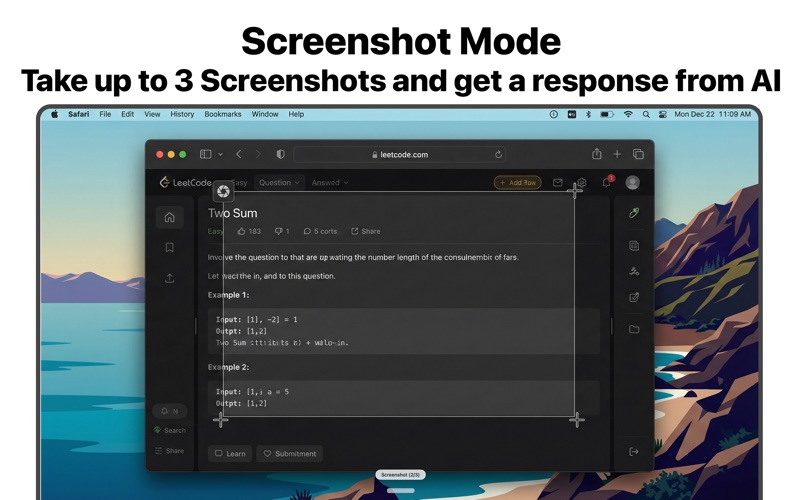


Description
Instant AI Answer & Grammar Correction
Unlock the power of AI instantly, anywhere on your Mac. Capy Voice acts as your intelligent companion, seamlessly correcting grammar in real-time and providing instant answers without breaking your flow.
KEY FEATURES
VISUAL INTELLIGENCE (NEW)
Capy Voice now sees what you see. Take screenshots instantly and let AI analyze them. Need to extract text from an image, debug code, or understand a chart? Just snapshot and ask.
- Analyze: Context-aware answers based on your screen.
- OCR: Instantly convert screenshots to editable text.
- Multi-Shot: Capture up to 3 images for complex context.
SPEAK PERFECTLY, EVERYWHERE
Say goodbye to typos and awkward phrasing. Capy Voice listens to your speech and instantly pastes grammatically perfect text into any application—Teams, Slack, Mail, Notes, and more.
NATIVE SPEED OR CLOUD POWER
Choose your intelligence engine.
- Speech: Run entirely on-device with the Native Speech Engine for maximum privacy, or choose OpenAI, Groq, or Deepgram for specialized needs.
- Intelligence: Connect to your preferred AI models including Google Gemini, ChatGPT, Claude, or OpenRouter.
STEALTH MODE
Stay focused and private. Stealth Mode ensures Capy Voice remains hidden from screen sharing in Zoom, Teams, and Google Meet, so your secret weapon stays secret.
INSTANT KNOWLEDGE
Need a quick answer? Just ask. Capy Voice can switch from dictation to "Interview Mode" to answer questions directly, acting as a knowledgeable sidekick for your meetings and research.
SHORTCUTS (SANDBOX)
Designed for speed, Capy Voice stays out of your way until you need it.
- Record / Stop: Control + Option + R
- Take Screenshot: Command + Option + 4 (Pro)
- Open Settings: Control + Option + S
PRIVACY FIRST
We believe your voice data belongs to you. Capy Voice offers robust privacy controls, including an on-device speech engine that never sends audio to the cloud.
Download Capy Voice today and give your productivity a voice.