
iPhone Screenshots


Description
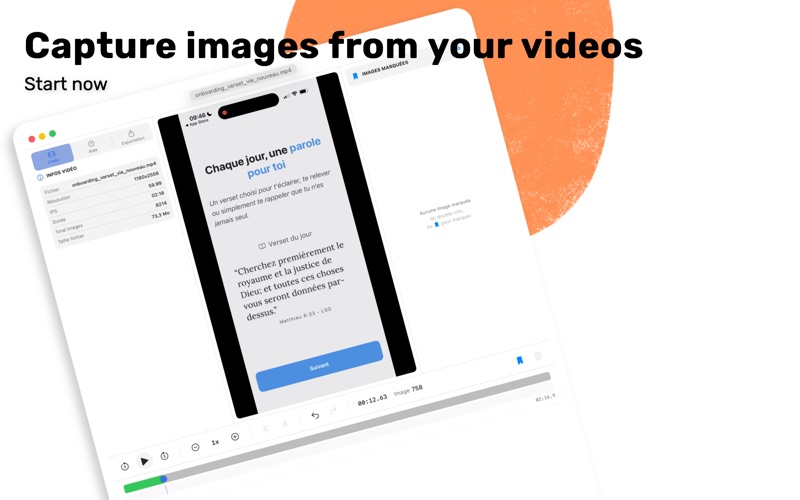
Frame Picker extracts perfect frames from your videos with precision and ease. Load any video (MP4, MOV, M4V), navigate frame by frame, mark the moments you want to capture, and export them as high-quality images. FEATURES • Precise Navigation - Use the progress bar, keyboard shortcuts, or playback speed control (0.5x to 4x) to find the exact frame • Mark Frames Instantly - Press M, double-click, or use the Mark button to save frames during playback • Multiple Export Formats - PNG (lossless), JPEG, HEIC, AVIF, WebP, and TIFF with adjustable quality • Navigate Between Markers - Jump between marked frames with arrow keys (← →), move markers with ⌥← ⌥→ • Project Support - Save your work and resume later with project files (.fpk) • Auto-Save - Never lose your work with automatic project saving • Undo/Redo - Accidentally removed a marker? Just press ⌘Z • Customizable Shortcuts - Configure keyboard shortcuts to match your workflow • Native macOS Design - Clean, intuitive interface that follows Apple design guidelines • Multilingual - Available in English, French, and German PERFECT FOR • Video editors extracting reference frames • Photographers capturing stills from video footage • Content creators making thumbnails • Sports analysts reviewing game footage • Animators studying motion references • Anyone who needs the perfect frame from a video FREE VERSION Try Frame Picker with 5 free exports in JPEG format. Unlock the full version for unlimited exports in all formats including lossless PNG and professional TIFF.