
iPhone Screenshots


Description
ThruHole - Transfer Files at Warp Speed!
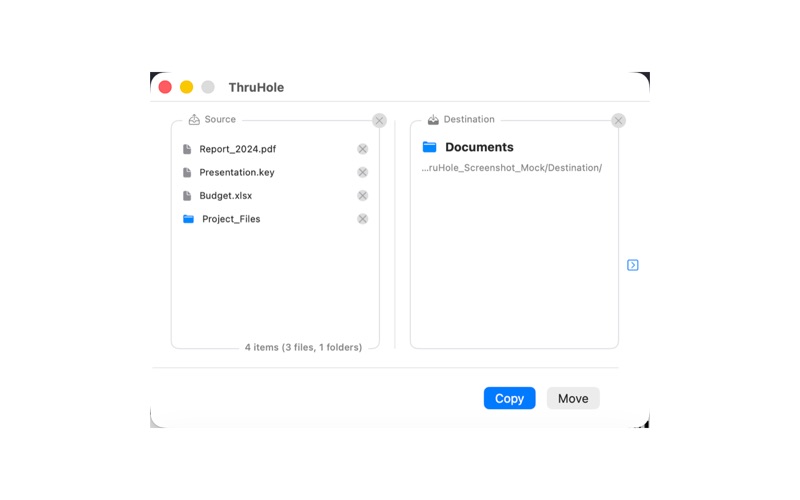
Tired of dragging files between two Finder windows? ThruHole makes file transfer incredibly simple: just drag files to the Dock, choose a destination, and you're done in one second.
CORE FEATURES
• Drag & Drop Transfer - Drop any file or folder onto ThruHole's Dock icon, and the transfer interface pops up automatically
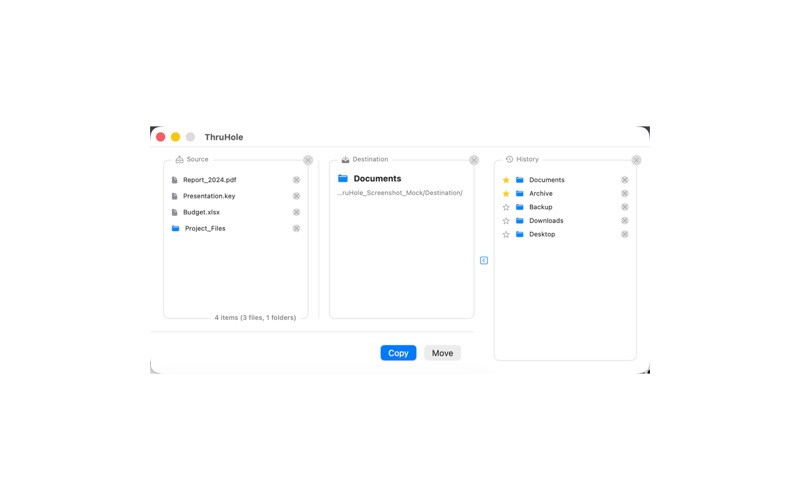
• Quick Destination Selection - Use history, star favorite folders, or quickly select a new destination
• Batch Transfer - Handle multiple files and folders at once, with copy or move options
• Smart Validation - Automatically detects duplicate items and destination conflicts to prevent errors
CONVENIENT FEATURES
• History - Automatically records your last 20 destinations for quick repeat operations
• Star System - Star your frequently used folders to keep them always at the top
• Default Destination - Set a common folder as default, auto-loaded every time you open
• Immediate Action Mode - Auto-transfer files to default destination after drop, no window needed
FLEXIBLE SETTINGS
• Auto-clear source after operation
• Show/hide full file paths
• Show/hide file statistics
• Auto-open window on drop
• Immediate action (Copy/Move)
SAFE & RELIABLE
• Uses macOS Security-Scoped Bookmarks for secure file access
• Complete error handling with clear transfer results
• App Sandbox support for system security
• Open destination folder or view details after transfer
USE CASES
• Organize files into different folders
• Quick backup of important documents
• Batch move downloaded files
• Regular desktop cleanup
• Transfer files to external drives
TECHNICAL HIGHLIGHTS
• Native macOS app built with Swift + SwiftUI
• Lightweight and fast, minimal system resources
• Supports macOS 13.0 and above
• Full support for Apple Silicon and Intel Macs
---
Let ThruHole be your file transfer assistant and spend your time on what truly matters!
For questions or suggestions, please contact us through the support page.
Terms of Use: https://www.apple.com/legal/internet-services/itunes/dev/stdeula/