
iPhone Screenshots


Description
This is the laptop anti-theft app I wanted for myself.
Other MacBook anti-theft tools I tried felt like weekend projects: unreliable triggers, clunky interfaces, and sketchy data practices. Rex is the one I actually trust to protect my own MacBook Pro all day.
Rex is built for people who work out of cafés, co-working spaces, airports, and hotel lobbies. It turns your MacBook Air or Pro into a smart alarm that quietly arms itself in the background, then makes a lot of noise when someone tries to walk off with it.
No fumbling with “arm / disarm” buttons. No awkward false alarms every time you close the lid. No “silent” failures when you forget wired headphones are plugged in.
--------------
+++ REX HAS A MISSION: To reduce the number of stolen MacBooks on the planet. +++
REX PROTECTS WITHOUT CONSTANT MANUAL ARMING AND DISARMING
— Smart Always-armed Mode: Rex's carefully designed behaviors keep your MacBook safe, without you having to think about it
— Rex alarms immediately when:
...your MacBook is closed
...the screen is locked and your power is pulled
— Unlocking your MacBook by TouchID or password automatically clears in-progress alarms
— Pack-up grace window (~10s) — lock → close lid within 10s let's Rex know you're packing up and should disarm
— ...and Rex re-arms automatically the next time you open your MacBook
REX PROTECTS IN WAYS OTHERS DON'T
— Headphone-proof: Forgot your headphones plugged in? No problem.
...Rex *always* plays alarms (loudly) through your MacBook’s built-in speakers.
— Muted your volume? No problem.
...Rex overrides volume settings to play alarms, and restores volume settings when alarms are cleared.
PUSH NOTIFICATIONS
— Real push notifications to your phone - you know instantly when an alarm is triggered or clears
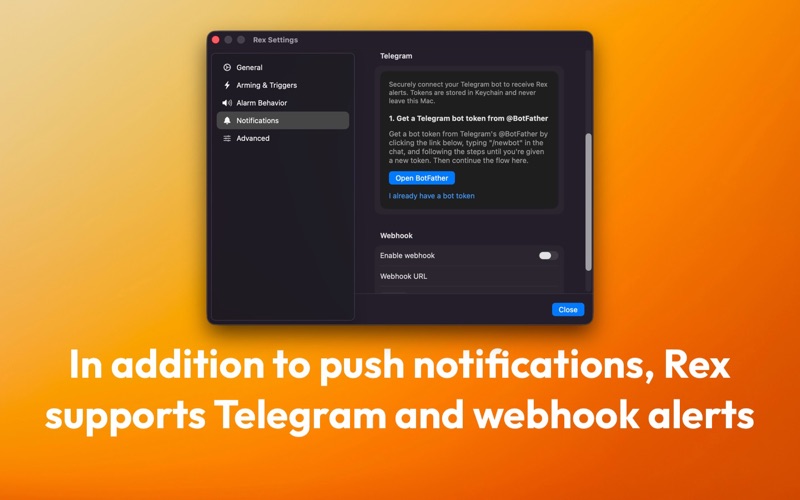
— ...for those that prefer it, we also support notifications via Telegram or Webhook
— Telegram integration — alerts to your bot/channel; tokens stored in Keychain
— Webhook callbacks (HTTPS) — pipe alarms into automations, incident channels, or your own systems
CUSTOMIZABLE
— Custom arming configuration for those who prefer full manual control
...customize every aspect of Rex's behavior
— Multiple siren choices — pick the sound you want people to notice
TRUSTWORTHY
— Privacy-first by design: all logic runs locally on your MacBook
— No cloud account, no analytics SDK, no ad tracking, no location services
— No data ever leaves your device, except notifications that you choose to receive
— No asking for your phone number or personal details
---
Rex is Perfect for
• People who work from cafés and shared spaces
• Digital nomads and frequent travellers
• Students in libraries or campus lounges
• Anyone who wants a “set it once and forget it” alarm for their MacBook
Install Rex on your MacBook, enable Smart Always-Armed mode, pick your alarm sound and push notifications, and carry your laptop with more confidence.
Terms of Use: https://www.apple.com/legal/internet-services/itunes/dev/stdeula/
Privacy Policy: https://rexprotects.com/privacy/