
iPhone Screenshots



Description
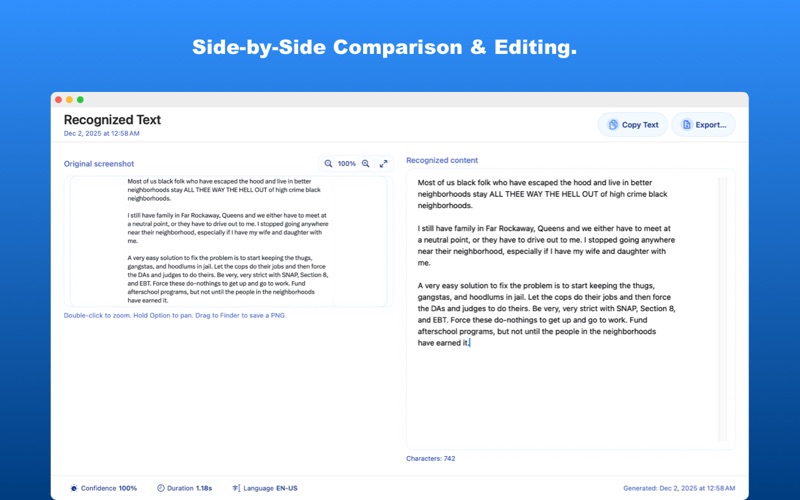
Stop retyping text from images. OmniText instantly extracts editable text from screenshots, and your clipboard using Apple Vision technology. 100% Private & On-Device.
Use the main window, a ScreenCapture overlay, or the menu bar panel to run local recognition without accounts, sign‑in, or cloud uploads.
Perfect For
- Students: Extract quotes from lecture slides instantly.
- Developers: Copy error codes from un-selectable UI.
- Designers: Grab copy from competitive apps for analysis.
Core features
- Three capture entry points: region screenshot, image import, and clipboard image in one streamlined layout.
- ScreenCapture overlay with crosshair selection that hides regular windows, then shows a 1024×720 result window with zoom, inline editing, copy, and export.
- History view with time filters (Today, Yesterday, This Week, This Month, Last 30, Last 90, All), search, thumbnails, and quick export.
- Menu bar panel with quota ring and quick actions so you can capture even when the main window is closed.
- On-device engine built on Apple Vision with support for English and Chinese (Simplified and Traditional), plus additional languages in Pro.
- Flexible export formats: TXT, Markdown, Word (DOCX), and PDF.
Use cases
- Grab interface copy during design reviews.
- Extract text from scanned documents and research figures.
- Capture quotes from chats and social media without retyping.
Free vs. Pro
- Free: 3 recognition runs per day, recent history, and core export formats.
- Pro: Unlimited runs, extended history, more languages, customizable shortcuts, and default export settings.
- One-time 3-day trial so you can experience Pro before subscribing.
Why OmniText
- On-device only: recognition stays on your Mac for maximum privacy.
- Mac-first workflow with menu bar access, keyboard shortcuts, and a focused result window.
- Thoughtful history with previews and filters so important captures never get lost.
- Subscriptions: Monthly and Annual auto-renew until canceled in Settings > Apple ID > Subscriptions; Lifetime is a one-time purchase. Pricing follows your App Store region and is shown in-app.
- Privacy Policy: https://silken-canoe-1be.notion.site/OmniText-Privacy-Policy-2bd2dafa212580039ac4d28d4cbc0569
- Terms of Use (EULA): https://www.apple.com/legal/internet-services/itunes/dev/stdeula/
Install OmniText to turn every screenshot, image, and clipboard capture into text you can actually work with.