
Termiux
Run commands in a Linux terminal
TERMUX LIMITED LIABILITY COMPANY
iPhone Screenshots




Description
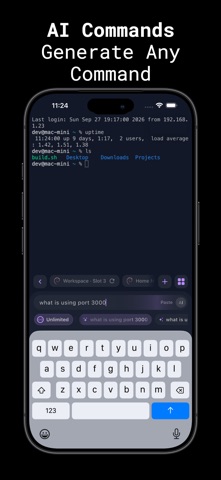
Run command-line operations natively on iOS with full shell emulator support. Execute bash and zsh commands locally. Use virtual keyboard with full keybinds. Access AI command suggestions. Customize themes, fonts, and backgrounds.
Termiux – Linux Emulator & SSH, SFTP on iPHone
A powerful and easy-to-use SSH, SFTP & terminal application designed for iPhone. Start working immediately with a built-in terminal experience, or securely connect to your own remote servers whenever needed.
BUILT-IN TERMINAL
Access a ready-to-use terminal directly from the app.
Run command-line operations, navigate directories, test commands, work with scripts, and perform common terminal tasks without needing to connect to another device or server first.
EXTENDED KEYBOARD
Work faster with an extended keyboard designed specifically for command-line use.
Quickly access commonly used keys such as:
• Ctrl
• Alt
• Tab
• Esc
• Arrow keys
• Function keys
• Common terminal shortcuts
The keyboard is optimized to make terminal interaction more comfortable on a touchscreen.
TOUCH-FRIENDLY TERMINAL
Interact with terminal sessions naturally using intuitive touch controls.
Scroll through output, navigate sessions, select content, and work with commands through an interface designed for mobile devices.
CUSTOMIZE YOUR TERMINAL
Personalize your terminal to match your preferred working style.
Choose from:
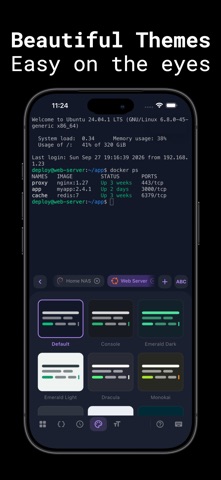
• Multiple terminal themes
• Different fonts
• Adjustable font sizes
• Custom backgrounds
• Appearance preferences
• Terminal display settings
Create a workspace that feels comfortable for both quick commands and longer sessions.
FAST & SECURE SSH CONNECTIONS
Connect to your own remote servers through SSH quickly and securely.
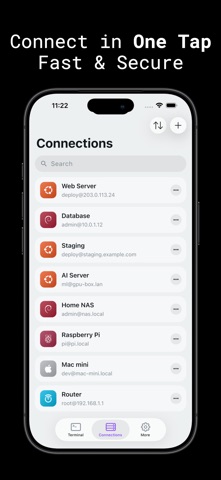
Create and manage server profiles for faster access while keeping connection information securely stored on your device.
Important server and connection details are displayed clearly, making it easy to identify, manage, and reconnect to your hosts.
SFTP FILE BROWSER
Browse files and folders on your remote servers using the integrated SFTP file browser.
You can:
• Browse remote directories
• View files
• Navigate folders
• Access server content
• Manage files alongside terminal sessions
Terminal access and remote file browsing are available together in one convenient application.
CLEAR & INTUITIVE INTERFACE
The interface is designed to provide powerful terminal functionality while remaining simple and easy to understand.
Connection information, server details, terminal sessions, files, and important status information are presented clearly for quick access.
BUILT FOR MOBILE WORKFLOWS
Useful for:
• Command-line operations
• SSH server access
• Server administration
• Script development and testing
• Git workflows
• File system navigation
• Remote file access through SFTP
• Network diagnostics
• Development and server management
Whether you want to use the built-in terminal or securely access your own remote infrastructure, Terminal for iPhone provides a practical command-line workspace directly on your device.
Terms of Use:
https://termux-studio.org/terms-of-use
Privacy Policy:
https://termux-studio.org/privacy-policy