
iPhone Screenshots



Description
ChronoFix is a powerful, native macOS application designed to help you manage file timestamps with precision and ease. Whether you need to organize photos, correct file dates, or batch-update timestamps across multiple files, rename files, ChronoFix provides an intuitive interface with advanced features.
Key Features
Four Powerful Operation Modes
• Offset Mode: Adjust timestamps by adding or subtracting time from current values. Perfect for correcting camera clock errors or timezone issues while preserving relative timing between files.
• Fixed Mode: Set all selected files to the exact same date and time. Ideal for organizing files by event date or creating uniform timestamps.
• Copy Mode: Copy one timestamp type to another. Synchronize Created, Modified, and EXIF dates with a single operation.
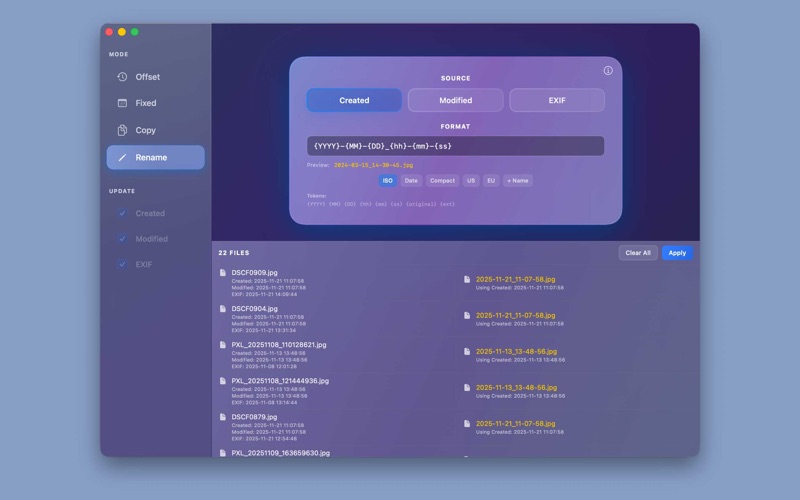
• Rename Mode: Rename files based on their timestamps using custom format patterns. Use tokens like {YYYY}, {MM}, {DD}, {hh}, {mm}, {ss}, and {original} to create meaningful filenames.
Comprehensive Timestamp Support
• Update file creation dates
• Modify file modification dates
• Update EXIF date/time metadata in image files (JPEG, HEIC, TIFF, RAW formats)
• Select which timestamps to update with granular control
Batch Processing
• Process entire folders recursively with a single operation
• Handle thousands of files efficiently
• Real-time progress tracking with detailed file information
• Process multiple timestamp types simultaneously
Real-Time Preview
• See exactly what will change before applying modifications
• Two-column view showing original and new timestamps side-by-side
• Visual highlighting of timestamps that will be modified
• Preview updates instantly as you adjust settings
EXIF Metadata Support
• Built-in ImageIO framework support for common image formats
• Optional ExifTool integration for advanced RAW format support
• Preserves all existing EXIF metadata while updating dates
• Updates DateTimeOriginal, DateTimeDigitized, and TIFF DateTime fields
Intuitive Interface
• Clean, modern design built with SwiftUI
• Drag-and-drop file support
• Organized layout with clear sections
• Keyboard shortcuts for efficient workflow
Perfect For
• Photographers: Correct camera clock errors, organize photos by event date, or synchronize EXIF dates with file timestamps
• File Organizers: Batch-update timestamps to organize files chronologically
• Content Creators: Maintain consistent timestamps across project files
• Anyone who needs precise control over file timestamps
Privacy & Security
ChronoFix respects your privacy. All file operations are performed locally on your Mac. The app never sends your files or data to any external servers. ChronoFix is sandboxed and only accesses files you explicitly select.