
iPhone Screenshots



Description
Transform your iPhone and iPad into a professional wireless game controller for your computer. Experience ultra-low latency control, fully customizable layouts, and precision input for apps, games, and productivity.
KEY FEATURES
• WIRELESS CONTROL
Connect via Wi-Fi, peer-to-peer (AWDL), or USB-C/Lightning cable. Binary UDP/TCP protocols ensure minimal input lag with automatic reconnection and quality monitoring.
• PRECISION TOUCHPAD
High-precision touchpad with dual modes:
- Relative mode for FPS and gaming (with adjustable sensitivity)
- Absolute mode for precise cursor positioning
- Tap-to-click and scroll wheel support
- Subpixel accuracy for smooth movement
• CUSTOMIZABLE LAYOUTS
Design unlimited controller layouts tailored to each game and application:
- Custom buttons (circular & square shapes)
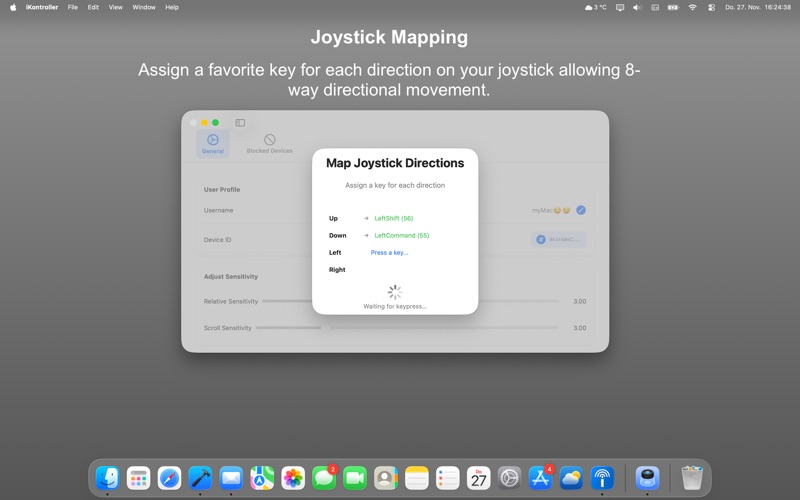
- Joysticks with 8-way directional movement
- Mouse click regions (left, right, or combined)
- Precision scroll wheel with adjustable sensitivity
- Precision Touchpad
- Drag-and-drop positioning and resizing for portrait and landscape
- Per-device layout storage
• ADVANCED KEY MAPPING
Map your buttons and joysticks to keyboard keys:
- Real-time key capture from your Mac's keyboard
- Support for modifiers (Shift, Command, Option, Control)
- Joystick direction mapping (WASD, arrow keys, custom) for your favorite games and apps
- Per-device mapping persistence
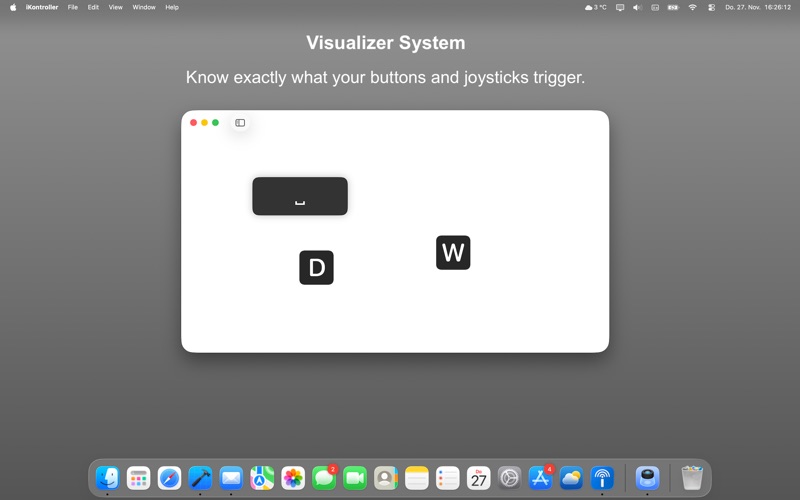
- Visual feedback for active keys
• HAPTIC FEEDBACK
Immersive tactile response with customizable intensity:
- Light, medium, heavy, and impact presets
- "Real Feel" continuous haptic mode
- Per-control haptic customization
- Synchronized with button presses
• FLEXIBLE CONNECTIVITY
Multiple connection methods for reliability:
- Same Wi-Fi network (fastest)
- Direct peer-to-peer AWDL
- USB-C or Lightning cable (zero latency)
- Automatic fallback and reconnection
- Connection quality monitoring
• SECURE PAIRING
One-time 6-digit code pairing with device management:
- Pair multiple iPhones and iPads to one Mac
- Block unwanted pairing requests
- Device name recognition
- Forget, unpair and block devices easily
• ULTRA-LOW LATENCY PROTOCOLS
Optimized binary protocols for gaming performance:
- Separate TCP channels for controls and touchpad
- Binary UDP packets for real-time input
- Packet loss recovery
- Sub-20ms input latency over local networks
PERFECT FOR
- FPS games
- Strategy games
- MMORPGs requiring complex controls
- Creative apps
- Remote desktop control
- Any Mac app or game with keyboard and mouse controls
REQUIREMENTS
- macOS 14.0 or later
- Wi-Fi network or USB-C/Lightning cable
- Accessibility permissions (for input simulation)
- The companion app named "iKontroller" on the iOS App Store
SYSTEM COMPATIBILITY
- Apple Silicon (M1, M2, M3, M4) and Intel Macs
- Works with macOS full-screen/minimized/windowed apps and games
TECHNICAL HIGHLIGHTS
- Binary protocol optimization for minimal bandwidth
- UUID-based device authentication for bulletproof security
- Subpixel mouse accumulator for precision (Touchpad)
- Network path monitoring and adaptation
PRIVACY & SECURITY
- All communication is local (no cloud servers)
- One-time pairing code authentication
- Device-level blocking and management
- No personal data collection
- No analytics or tracking
STEPS:
- Download "iKontroller Desktop" from the Mac App Store.
- Download "iKontroller" from the App Store on your iPhone and iPad.
- Set and pair them up using iKontroller’s atomic and secure pairing system.
- Once paired and connected; create your perfect Layout by adding Controls and customizing them.
- Enter Editor Mode to re-position and re-size your Controls.
- Enter Mapping Mode to map your Joysticks & Buttons to Keyboard Keys on your Mac.
- Enjoy your favorite games and apps!
Enjoy lag-free wireless gaming with the controller you design yourself.