
iPhone Screenshots
Description
This is a desktop video conversion toolkit designed for creators and advanced users, aiming to provide compact, playable video files directly on devices while ensuring visual fidelity.
**Extensive Input Support:** You can drag and drop or multi-select videos from virtually any source—MP4, MKV, MOV, AVI, FLV, WMV, WebM, TS/M2TS, M4V, etc.—and convert them to universal H.265/HEVC MP4 files.
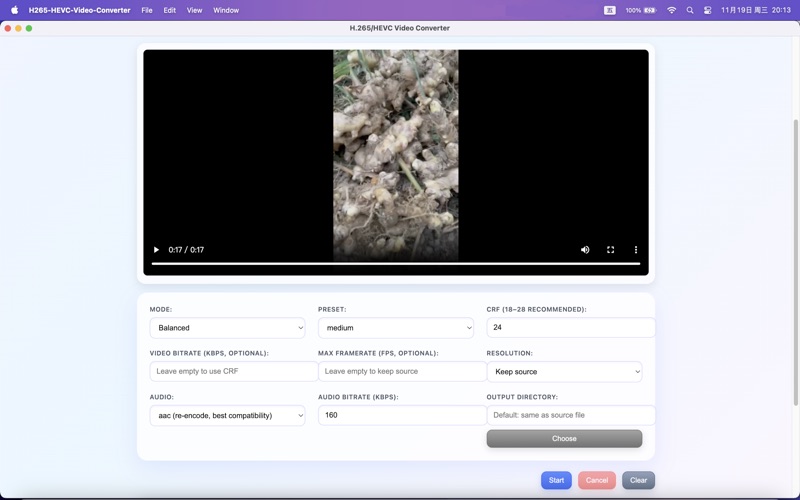
**Intelligent Compression Control:** You can choose preset modes that prioritize speed, balance, or file size, or fine-tune each parameter yourself: CRF, preset mode, target bitrate, maximum frame rate, resolution cap (1080p → 8K), x265 level, audio codec (AAC/Copy/Opus), and audio bitrate.
**Batch Automation:** You can add multiple videos to a queue at once; the application processes them sequentially, records detailed progress, and supports canceling the current task and quickly clearing the queue for a new batch. Preview-First Workflow
The built-in player features automatic rollback transcoding. When the source format is not natively supported, a 10-second MP4 preview is generated, allowing you to always know what you're about to convert.
Smooth User Experience
Drag-and-drop workspace, responsive controls, progress logs, and a clean, gradient interface make everyday transcoding tasks easy and worry-free.
This program is ideal for archiving video footage, preparing materials for social media platforms, 4K/8K master compression, or standardizing heterogeneous video libraries into a single, efficient HEVC directory.