
iPhone Screenshots



Description
Keep your most important files and folders just one click away with StickyExplorer. Create floating StickyExplorer notes on your desktop that hold shortcuts to your frequently accessed files, folders, and projects.
INSTANT ACCESS TO YOUR FILES
Stop wasting time searching through Finder. Add files and folders to StickyExplorer notes and open them instantly with a single click. Perfect for designers, developers, writers, and anyone who works with multiple files throughout the day.
ORGANIZE YOUR WORKFLOW
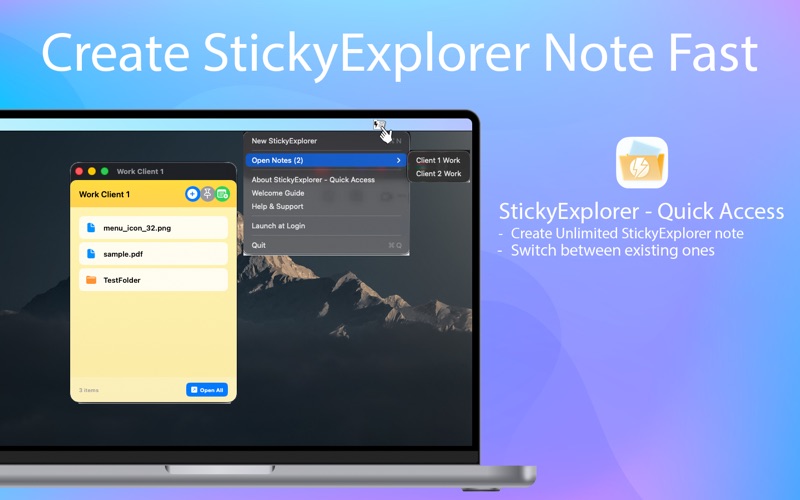
Create separate StickyExplorer notes for different projects, clients, or tasks. Each StickyExplorer note can hold unlimited files and folders, helping you stay organized and focused on what matters most.
INSTANT PREVIEW
Hover over any file or folder to see a quick preview without opening it. Preview images, text files, and folder contents instantly. Save time by checking file contents before opening them.
ALWAYS VISIBLE
Pin notes to stay on top of all other windows, ensuring your important shortcuts are always visible. Unpin them when you need more screen space. The choice is yours.
SIMPLE AND INTUITIVE
Drag and drop files directly onto StickyExplorer notes, or use the built-in file picker. Rename StickyExplorer notes by double-clicking the title. Remove items with a single click. Everything works exactly as you would expect.
MENU BAR CONVENIENCE
Access all your StickyExplorer notes from the menu bar. Create new StickyExplorer notes, switch between existing ones, or open all files in a StickyExplorer note at once. Your workflow stays uninterrupted.
PERSISTENT AND RELIABLE
All your notes are automatically saved. When you restart your System or reopen the app, everything is exactly where you left it. Your shortcuts are always ready when you need them.
PRIVACY FOCUSED
StickyExplorer stores everything locally on your System. No cloud sync, no accounts, no data collection. Your files and folders stay private and under your control.
OPTIONAL AUTO-START
Choose whether StickyExplorer launches automatically when you log in. The app asks for your permission on first launch and you can change this setting anytime from the menu bar.
KEY FEATURES
- Create unlimited StickyExplorer notes
- Add unlimited files and folders to each note
- Drag and drop support
- Pin notes to stay on top
- Quick access from menu bar
- Automatic saving and restoration
- Rename notes with double-click
- Open all items in a note at once
- Show files in Finder
- Copy file paths
- Works entirely offline
PERFECT FOR
- Designers managing project assets
- Developers accessing code repositories
- Writers organizing research materials
- Students keeping track of assignments
- Anyone who works with multiple files daily