
iPhone Screenshots


Description
LudyLens brings powerful optical character recognition (OCR) to your Mac. Capture text from anywhere on your screen with a simple keyboard shortcut.
KEY FEATURES
• Quick Lasso Capture
Use a single global shortcut to draw a rectangle over any part of your screen and instantly capture the text inside it.
• Repeat Last Lasso
Re-capture the same region (subtitles, stock tickers, dashboards) with another shortcut – ideal for frequently changing text.
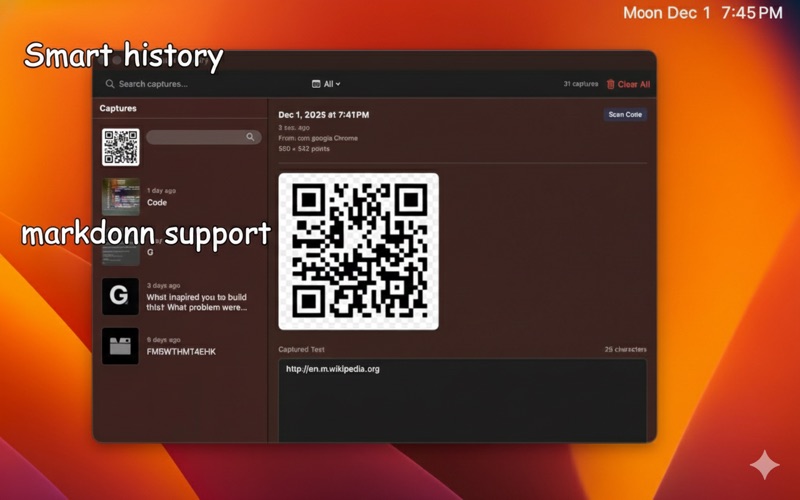
• NEW: Read QR & Barcodes
Scan QR codes, barcodes, and data matrices directly from your screen. Supports QR, Aztec, DataMatrix, PDF417, EAN-8/13, UPC-E, Code 39/93/128, and more.
• NEW: Import from iPhone
Use Continuity Camera to capture photos, scan documents, or add sketches from your nearby iPhone or iPad directly into TextGlance.
• On-device OCR, No Accounts
LudyLens uses Apple's built-in Vision framework to recognize text on your Mac. No cloud processing, no login, and nothing leaves your device.
• Capture History
Every capture is saved in a simple history window with timestamp, thumbnail, and full text. Quickly search, filter, and re-copy recent snippets.
• Code-friendly Mode
Preserve indentation and plain quotes when capturing code from videos, terminals, or screenshots so it pastes cleanly into your editor.
PERFECT FOR
• Developers: Copy code from tutorials and documentation
• Researchers: Extract text from PDFs and images
• Students: Capture lecture slides and study materials
• Designers: Extract text from mockups and designs
• Everyone: Convert any on-screen text to editable format
PRIVACY FIRST
Ludy processes everything on your device. No cloud uploads, no analytics, no tracking. Your captures stay private.
SYSTEM REQUIREMENTS
• macOS 15.0 (Sequoia) or later
• Screen Recording permission (required for capturing screen content)
PRICING
Free tier includes 3 captures per day. Upgrade to Premium for unlimited captures at a one-time price of $8.99 - no subscription required!
---
From the makers of productivity tools that respect your privacy.
Need help? send email to [email protected]
Privacy Policy: https://ludy.app/privacy