
iPhone Screenshots


Description
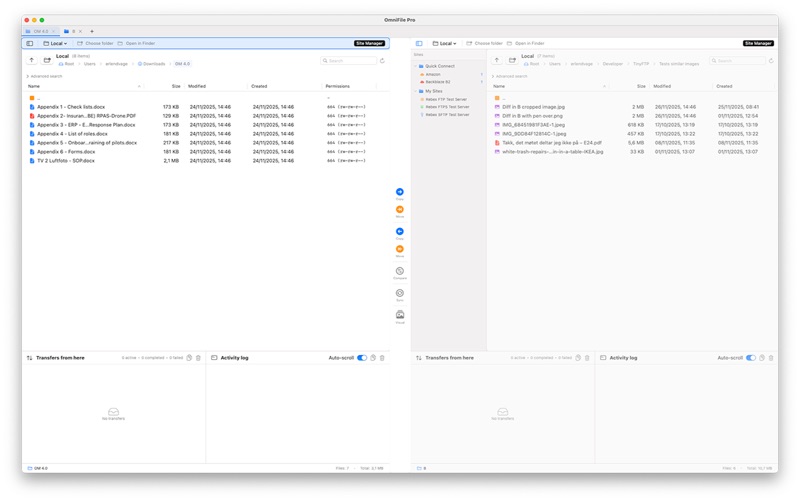
OmniFile is a powerful, intuitive, and secure file transfer client designed for macOS professionals. Experience seamless file management with an advanced dual-pane interface, multiple tabs, and comprehensive multi-protocol support.
Key Features:
• All Major Protocols: Connect via FTP, FTPS (Implicit & Explicit SSL), SFTP, Dropbox, Google Drive, Onedrive, Amazon S3, Backblaze B2, Wasabi, DigitalOcean Spaces, and other S3-compatible cloud services.
• Real Multi-Tab & Multi-Session: Easily work with several connections at once. Each tab remembers its own state, folder, queue, and sync actions.
• Dual-Pane & Drag & Drop: Effortlessly transfer files between panels, tabs, or Finder. Drag and drop is fully supported across all local and remote panels—just like Mac users expect.
• Powerful Sync & Compare: Synchronize entire folders, preview changes, handle conflicts smartly, and perform one-way or bi-directional syncs—now with even faster comparison and filtering.
• Next-Gen Transfer Queue: Batch upload, download, and sync across local, remote, and cloud with automatic retries, transfer resume, and cloud-to-cloud support (S3, B2, Wasabi). Visual queue lets you monitor every operation in real time.
• Cloud Storage Made Easy: Native support for S3 and other leading cloud storage services—explore, upload, move, and sync cloud folders like any other drive.
• Smart Automation: Save time with folder bookmarks, queue persistence across restarts, and “resume all” after accidental disconnects or app restarts.
• Duplicate & Visual Similarity Detection: Instantly scan for duplicate files or visually similar images across your drives and connected servers.
• Site Manager & History: Organize your connections in folders, browse history, and launch with one click. Import/export server settings for teams.
• Uncompromising Security: All credentials stored in the macOS Keychain, optional Touch ID unlock, and full SSL/TLS for every connection.
• macOS Native: Full support for light/dark modes, keyboard shortcuts, Quick Look integration, familiar context menus, and fast, fluid UI built for Apple Silicon.
• Pro File Operations: Copy, move, batch rename, bulk CHMOD, metadata preview—works everywhere, locally and remotely.
• Integrated Logging: See all transfers, history, and errors in a single place. Monitor activity live or export logs for auditing.
Whether you’re a developer, sysadmin, designer, or anyone managing cloud and servers, OmniFile gives you a professional, secure, and efficient file workflow on macOS.