
iPhone Screenshots



Description
FileForge brings the missing "New File" feature to macOS Finder's right-click menu – just like Windows and Linux have had for years.
INSTANT FILE CREATION
Right-click anywhere in Finder and create new files instantly. No need to open apps first, no complex workflows. Just click and create.
WORKS EVERYWHERE
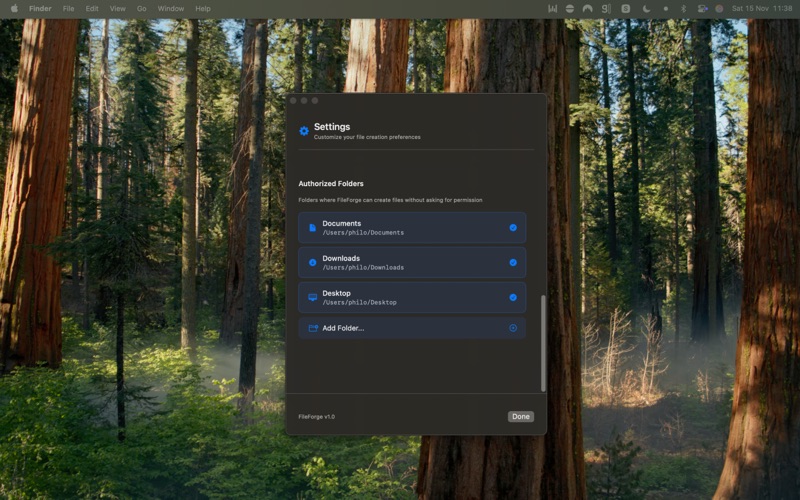
Create files in Desktop, Documents, Downloads, or any folder you choose. FileForge works seamlessly with your existing workflow.
YOUR FILE TYPES
Customize which file extensions appear in your right-click menu:
• Text files (.txt, .md)
• Code files (.swift, .py, .js, .html, .css)
• Data files (.json, .xml, .csv)
• Any custom file type you need
PRIVACY FIRST
FileForge only accesses folders you explicitly authorize. Your files stay private and secure. All processing happens locally on your Mac – no cloud services, no tracking, no data collection.
NATIVE & FAST
Built with Swift for macOS, FileForge is lightweight, efficient, and feels right at home on your Mac. Integrates seamlessly with Finder through Apple's official FinderSync framework.
PERFECT FOR
• Developers who need quick access to source files
• Writers creating new documents
• Designers organizing project files
• Anyone who creates files frequently
HOW IT WORKS
1. Launch FileForge and grant access to your desired folders
2. Right-click in Finder where you want to create a file
3. Select your file type from the FileForge menu
4. Start working immediately
NO SUBSCRIPTION
Pay once, use forever. No subscriptions, no recurring fees.
SYSTEM REQUIREMENTS
• macOS 13.5 or later
• Compatible with Apple Silicon and Intel Macs
Simple, fast, and essential for anyone who works with files on macOS.