
iPhone Screenshots


Description
Unformat is an elegant and powerful macOS application that automatically cleans your clipboard by removing any unwanted formatting (RTF, HTML, Markdown), keeping only plain text. No more pasting text with unwanted styles!
MAIN FEATURES
• Automatic clipboard cleaning
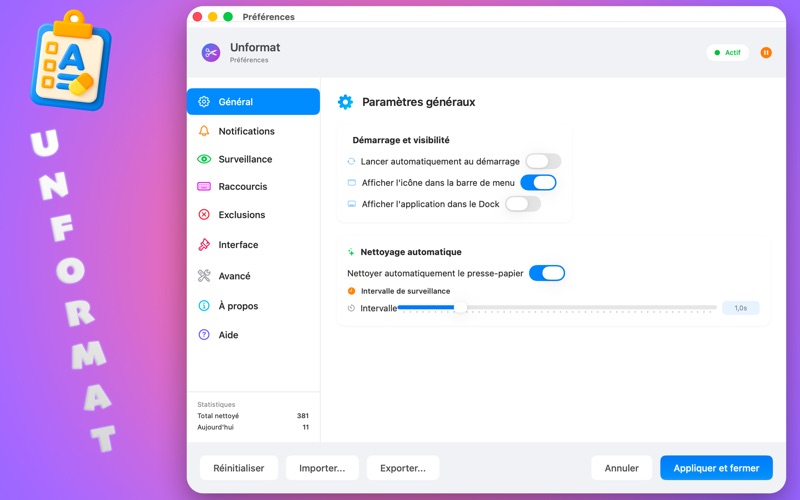
Monitor your clipboard in real time and automatically remove all formatting (bold, italics, colors, fonts, etc.) when copying text. Works in the background completely transparently.
• Advanced text transformations
• Remove formatting: strips RTF, HTML and other formatting
• Convert to uppercase: transforms all text to uppercase
• Convert to lowercase: transforms all text to lowercase
Modes can be combined based on your needs.
• Global keyboard shortcut
Use the ⌥⌘V (Option + Command + V) shortcut to quickly enable or disable Unformat anywhere on your Mac. Customizable in settings.
• Excluded applications
Choose apps where Unformat will not clean the clipboard automatically. Perfect for developers using Xcode, Terminal, or other tools that require preserved formatting.
• Multilingual interface
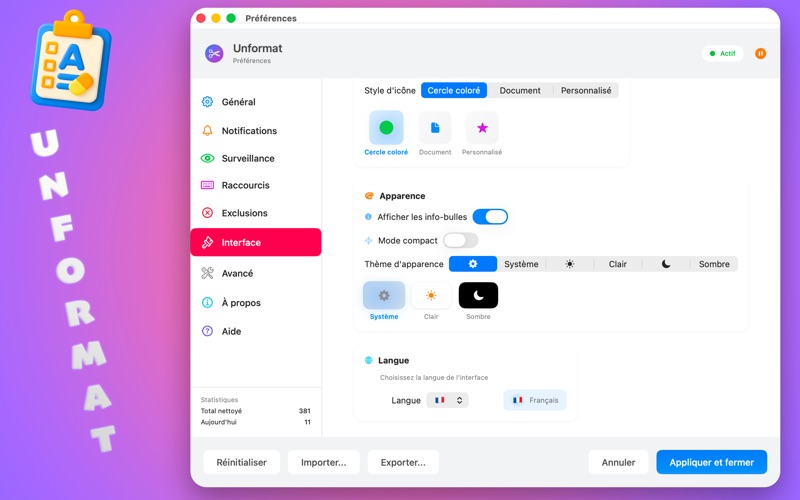
Available in French, English, Spanish and German. Change the language directly from preferences.
• Full customization
• Choose the menu bar icon style (colored circle, document, custom)
• Appearance theme: system, light or dark
• Customizable notifications with sounds and styles
• Visual feedback (HUD) with customizable positioning
• Compact mode for a streamlined interface
• Advanced monitoring options
• Adjustable monitoring interval
• Preserve images and files
• Preserve line breaks
• Ignore empty clipboard
• Selective cleaning (RTF, HTML, Markdown)
• Detailed statistics
Track how many times your clipboard has been cleaned with daily and total stats. Optional monthly reset.
• Bonus features
• Show/hide hidden Finder files directly from the menu
• Launch at startup
• Display in the menu bar or Dock
• Debug mode for troubleshooting
• Save and restore settings
WHO IS IT FOR?
Unformat is ideal for:
• Writers and editors who often paste formatted text from websites or documents
• Developers who want plain text without formatting
• Users working across multiple apps who want a clean clipboard
• Anyone who wants to save time by avoiding manual formatting cleanup
HOW IT WORKS
1. Install Unformat and launch the app
2. The app appears in your menu bar
3. Activate Unformat by clicking the icon or using ⌥⌘V
4. Copy formatted text anywhere
5. The formatting is automatically removed when you paste
It’s that simple! Unformat runs in the background and requires no action once set up.
PRIVACY & SECURITY
Unformat respects your privacy:
• All data stays on your Mac
• No Internet connection required
• No data collection
• Compliant with macOS App Sandbox security requirements
DOWNLOAD UNFORMAT NOW
Simplify your workflow and enjoy a clean clipboard at all times. Unformat is free and easy to use.