
iPhone Screenshots


Description
PageScreener - Full-Page Screenshots for Safari
Capture entire web pages in one click, no matter how long they are. PageScreener automatically scrolls through the page, takes multiple screenshots, and seamlessly stitches them together into a single high-quality image.
KEY FEATURES
Full-Page Capture
Capture complete web pages regardless of their length. Perfect for long articles, documentation, social media feeds, and any content that extends beyond your screen.
High-Quality Output
Supports Retina displays with full resolution preservation. Get crisp, clear screenshots that maintain the original quality of the webpage.
Flexible Formats
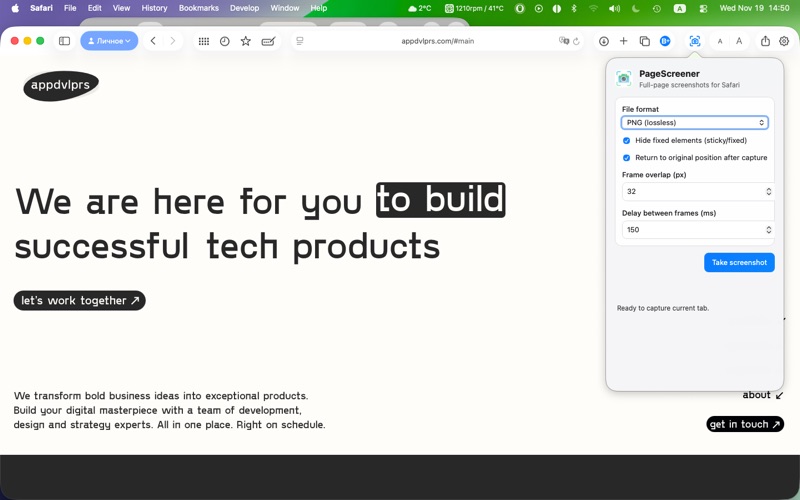
Save your screenshots in PNG (lossless) or JPEG format with customizable quality settings (60-100%). Choose the format that best fits your needs.
Smart Processing
Automatically hides fixed elements (sticky headers, fixed footers) to ensure clean, professional-looking screenshots without overlapping content.
Customizable Settings
Fine-tune your capture experience:
• Frame overlap (0-400px) for seamless stitching
• Delay between frames (0-2000ms) for pages with animations
• Return to original scroll position after capture
• Hide fixed/sticky elements option
Automatic Saving
Screenshots are automatically saved to your Downloads folder with timestamped filenames. No manual file management needed.
Fast & Efficient
Optimized scrolling and stitching algorithms ensure quick capture even for very long pages. Cancel anytime if needed.
PERFECT FOR
• Documentation and technical articles
• Long-form blog posts and news articles
• Social media feeds and timelines
• Web design mockups and references
• Archiving web content
• Creating visual documentation
HOW IT WORKS
1. Open any webpage in Safari
2. Click the PageScreener icon in the toolbar
3. Adjust settings if needed (format, quality, overlap)
4. Click "Take Screenshot"
5. Watch as PageScreener automatically scrolls and captures
6. Your full-page screenshot is saved to Downloads
TECHNICAL DETAILS
• Requires macOS 11.0 (Big Sur) or later
• Works with Safari 15.0 or later
• Supports pages up to 30,000+ pixels in height
• Native stitching for very large images
• No data collection or tracking
• Completely local processing
Get started today and capture the web, one full page at a time!