
iPhone Screenshots
Description
Transform Your QR Codes from Functional to Fabulous
Stylish QR Codes is a powerful yet intuitive QR code generator. Gone are the days of boring black-and-white squares—create QR codes that are as visually appealing as they are functional.
Beautiful by Design
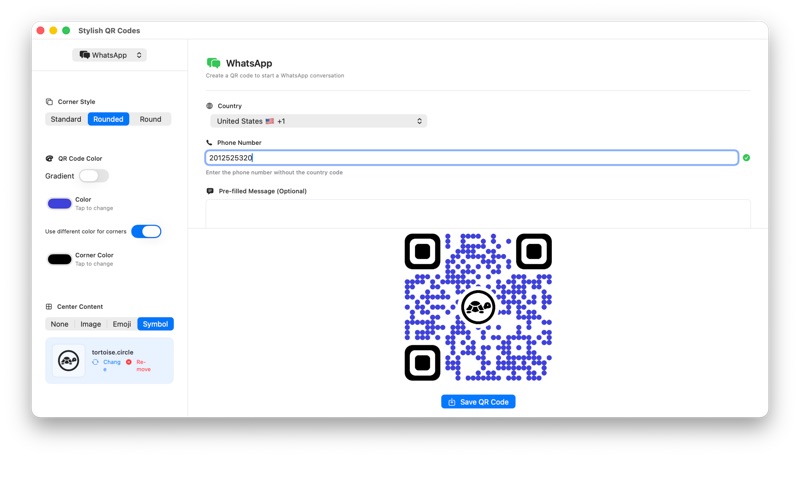
Built from the ground up for macOS, Stylish QR Codes features a native interface that feels right at home on your Mac. Every detail has been carefully crafted to provide an elegant, seamless experience that follows Apple's design principles. The app's clean, modern interface makes it easy to create professional-looking QR codes in seconds.
Endless Customization Options
Make your QR codes truly unique with extensive styling options:
• Dot Styles: Choose from Standard, Round, or Grid patterns to give your QR codes distinct personality
• Corner Styles: Customize the corner finder patterns with Standard, Rounded, or Round styles
• Color Control: Use solid colors or eye-catching gradients to match your brand or design
• Independent Corner Colors: Apply different colors to the corner patterns for extra visual impact
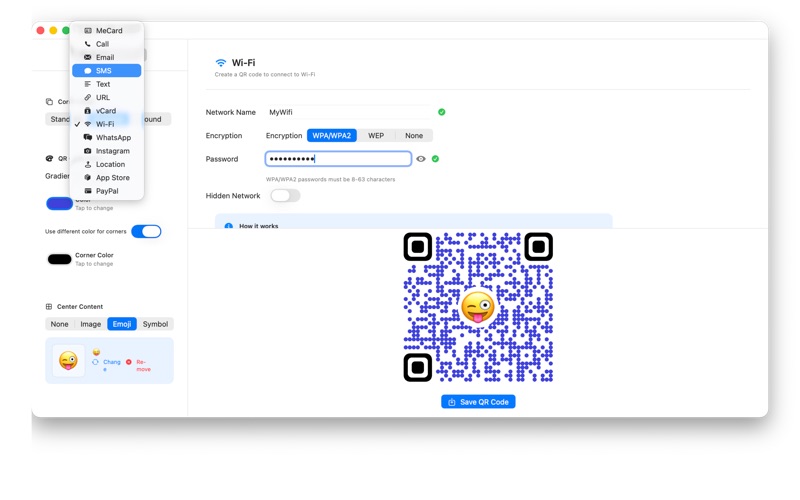
• Center Content: Add personality with custom images, emojis, or SF Symbols in the center of your codes
Perfect for Any Use Case
Whether you're a business owner creating codes for marketing materials, a designer working on branded content, or someone who simply wants their QR codes to look great, Stylish QR Codes has you covered:
• Business cards and promotional materials
• Event invitations and tickets
• Product packaging and labels
• Social media graphics
• Website and app links
• Contact information sharing
• Wi-Fi network sharing
Intuitive Workflow
Creating a styled QR code is simple:
1. Enter your text, URL, or data
2. Choose your preferred dot and corner styles
3. Select colors or create gradients
4. Optionally add center content for extra flair
5. Export your QR code as a high-quality PNG image
The live preview updates instantly as you make changes, so you always know exactly how your QR code will look. No guesswork, no surprises—just beautiful results.
Center Content That Stands Out
Add a personal touch to your QR codes with custom center content:
• Custom Images: Upload your logo, photo, or any image to make your codes instantly recognizable
• Emojis: Add fun and personality with any emoji character
• SF Symbols: Choose from thousands of professionally designed symbols that scale perfectly
The app intelligently ensures your center content doesn't interfere with the QR code's scannability, so you get the best of both worlds: style and functionality.
High-Quality Output
Export your QR codes as high-resolution PNG images, perfect for both digital and print use. Whether you're displaying your code on a website or printing it on business cards, Stylish QR Codes delivers crisp, professional results.
Built for macOS
Stylish QR Codes takes full advantage of macOS features:
• Native SwiftUI interface for smooth performance
• Drag-and-drop image support
• Keyboard shortcuts for quick workflows
• Retina-ready graphics
• System-wide color picker integration
• Standard macOS window management
Privacy First
Your data never leaves your Mac. All QR code generation happens locally on your device, ensuring your information stays private and secure. No internet connection required, no data collection, no tracking—just a simple, powerful tool that respects your privacy.
Regular Updates
Stylish QR Codes is actively maintained with regular updates bringing new features, improvements, and support for the latest macOS releases.
Get Started Today
Stop settling for plain, boring QR codes. With Stylish QR Codes, you can create codes that are functional, scannable, and beautiful. Whether you're a professional designer or just someone who appreciates good design, you'll love how easy it is to create QR codes that stand out from the crowd.
Download Stylish QR Codes today and discover how much better your QR codes can look.