
iPhone Screenshots




Description
ShortCat helps you remember and manage keyboard shortcuts for all your favorite macOS applications.
Never forget another keyboard shortcut. ShortCat lives in your menu bar, ready whenever you need to look up that shortcut you just can't remember.
KEY FEATURES
• Quick Access from Menu Bar
Click the menu bar icon to instantly view your shortcuts. Always there when you need it.
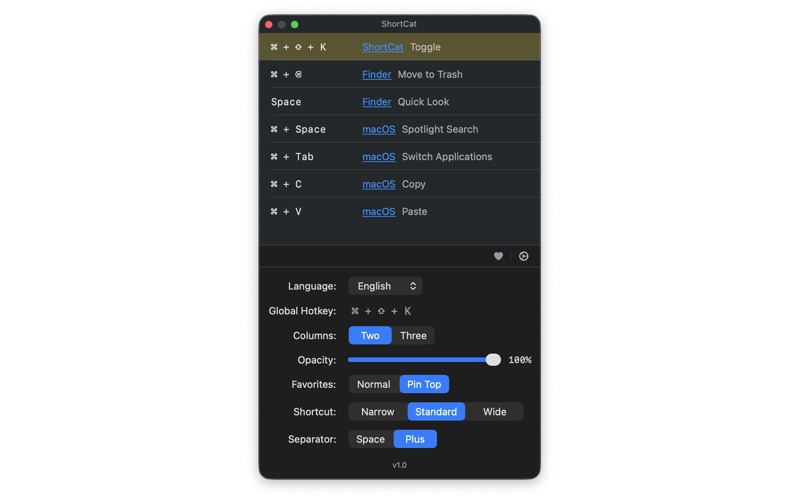
• Global Hotkey (Cmd+Shift+K)
Open ShortCat from anywhere with a global hotkey. Requires Accessibility permission for enhanced system integration.
• Organize by Application
Group shortcuts by app for easy browsing. Find Finder shortcuts, Xcode commands, or system-wide hotkeys in seconds.
• Favorite Important Shortcuts
Star your most-used shortcuts for instant access. Optional setting to show favorites at the top of the list.
• Fully Customizable
- Adjust window transparency (0-100%)
- Resize columns to your preference
- Choose between 2-column or 3-column layout
- Set minimum window width
- Toggle "+" symbol display in shortcuts
• Beautiful Native Design
- Clean, borderless table interface
- Automatic dark mode support
- Smooth animations and transitions
- Follows macOS Human Interface Guidelines
• Keyboard-Friendly
- Cmd+N: Add new shortcut
- Delete: Remove selected shortcut
- Enter: Edit shortcut
- Space: Toggle favorite status
• Multilingual Support
Full support for English, Traditional Chinese (繁體中文), and Simplified Chinese (简体中文).
PERFECT FOR
• Power Users - Master keyboard shortcuts across all your apps
• Developers - Remember IDE shortcuts and terminal commands
• Designers - Keep track of shortcuts in creative applications
• Students - Learn professional software more quickly
• Anyone - Work faster and more efficiently
HOW IT WORKS
1. Click the ShortCat icon in your menu bar
2. Browse your shortcuts or search by application
3. Add new shortcuts with the "+" button
4. Mark favorites for quick access
5. Customize the appearance in Settings
ShortCat stores all data locally on your Mac. No account required. No internet connection needed. Your shortcuts stay private and secure.
STAY FOCUSED
ShortCat is designed to stay out of your way. The window stays on top of other windows (optional), so you can reference shortcuts while working. Adjust transparency to see what's behind.
Right-click the menu bar icon to quit. That's it.
No subscription. No ads. No tracking. Just shortcuts.
REQUIREMENTS
• macOS 13.0 or later
• 5 MB disk space
• Accessibility permission (optional, for global hotkey)