iPhone Screenshots


Description
AllThatMouseVision - Advanced Image Processing Tool
App Description
AllThatMouseVision is a powerful real-time image processing application
that puts professional-grade filters and effects at your fingertips.
Designed for photographers, designers, researchers, and image processing
enthusiasts, this intuitive tool transforms complex computer vision
algorithms into an accessible, mouse-controlled interface.
Key Features:
15+ Professional Filters
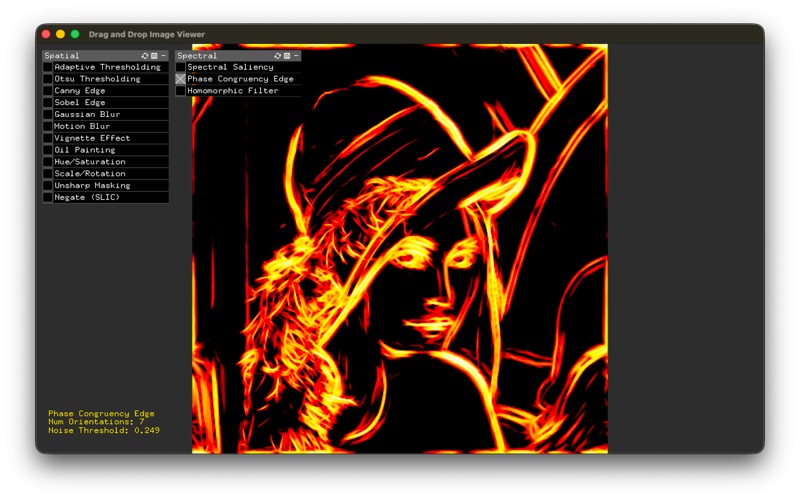
- Spectral Analysis: Spectral Saliency, Phase Congruency Edge Detection,
Phase Congruency Corner Detection, Homomorphic Filter
- Edge Detection: Canny, Sobel with adjustable parameters
- Thresholding: Adaptive Thresholding, Otsu Thresholding
- Enhancement: Gaussian Blur, Motion Blur, Unsharp Masking
- Creative Effects: Oil Painting, Vignette Effect, Hue/Saturation
adjustment
- Transformation: Scale/Rotation with real-time preview
Intuitive Mouse Control
Control all filter parameters in real-time by simply moving your mouse.
Horizontal movement adjusts one parameter, vertical movement adjusts
another - see results instantly without sliders or input boxes.
Smart Save System
- Press 'S' key to save your processed image
- Automatically embeds filter parameters in filename for easy tracking
- Supports PNG, JPG, and other popular formats
- Direct desktop or custom folder selection
- Includes file size and confirmation in save dialog
Simple Workflow
1. Drag & drop any image into the window
2. Select a filter from the GUI panel
3. Move your mouse to adjust parameters in real-time
4. Press 'S' to save when satisfied
5. Original and processed images displayed side-by-side
How to Use
Getting Started:
1. Launch AllThatMouseVision
2. Drag and drop an image file (JPG, PNG, etc.) into the application
window
3. Your image will appear on the left side
Applying Filters:
1. Use the GUI panels on the left:
- Spectral Panel: Advanced computer vision filters
- Spatial Panel: Traditional image processing effects
2. Click any filter toggle to enable it
3. Only one filter can be active at a time (automatic mutual exclusion)
Adjusting Parameters:
- Horizontal mouse movement (X-axis): Adjusts the first parameter (e.g.,
block size, threshold, blur amount)
- Vertical mouse movement (Y-axis): Adjusts the second parameter (e.g.,
sensitivity, angle, strength)
- Watch the processed result update in real-time on the right side
- Parameter values are displayed in the console for reference
Saving Your Work:
1. Press the 'S' key on your keyboard
2. A save dialog will appear
3. Navigate to your desired location (Desktop, Documents, etc.)
4. Enter a filename (extension optional - defaults to PNG)
5. Click Save
6. The app automatically appends filter parameters to the filename for
easy identification
7. Confirmation message appears with file size
System Requirements
- Operating System: macOS 10.12 or later / Windows 10 or later
- RAM: 4GB minimum, 8GB recommended
- Display: 1280x720 minimum resolution
- Storage: 100MB free space