
iPhone Screenshots


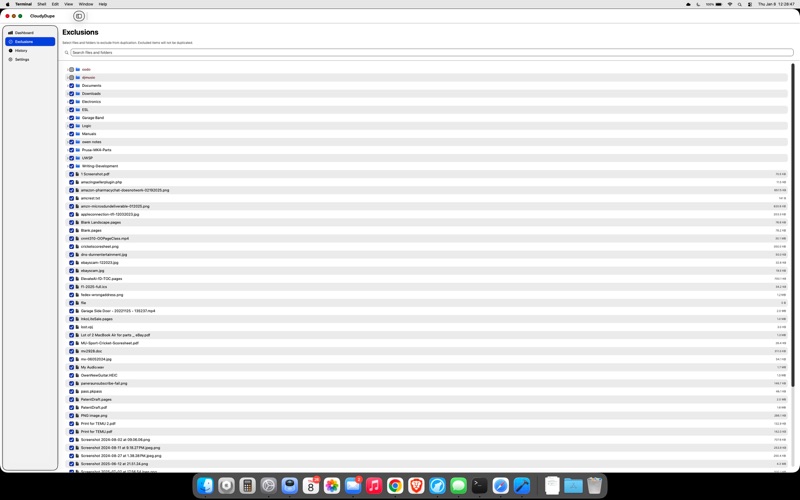

Description
CloudyDupe creates a local duplicate of your iCloud Drive.
PROTECT YOUR FILES
iCloud is convenient, but what happens if files are accidentally deleted, corrupted, or you lose access to your account? CloudyDupe mirrors your iCloud Drive to a local folder or external drive, so you have a copy.
SIMPLE & UNOBTRUSIVE
CloudyDupe lives in your menu bar, quietly working in the background. Start it once and forget about it. Manually control when it runs.
KEY FEATURES
• Menu Bar App — Runs silently in the background without cluttering your Dock
• Smart Discovery — Finds and tracks all files in your iCloud Drive, when you run it, on your schedule
• Cloud-Only Files — Downloads iCloud-only files before duplicating them
• Desktop & Documents — Full support for iCloud Desktop & Documents sync
• Checksum Verification — Ensures every copy is identical to the original
• Exclusions — Choose which files and folders to skip
• Low Impact Mode — Reduces CPU usage when you need maximum performance
• Progress Dashboard — Monitor duplication status and history at a glance
HOW IT WORKS
1. Select your iCloud Drive folder as the source
2. Choose a destination (local folder or external drive)
3. Click Resume — CloudyDupe handles the rest
Your files are duplicated with their full folder structure intact. When files change in iCloud, CloudyDupe detects and updates the duplicates automatically.
GREAT FOR
• Anyone who wants a local copy of their iCloud files
• People who've experienced iCloud sync issues before
Note: CloudyDupe creates a one-way mirror from iCloud to your destination. Changes made to the destination are not synced back to iCloud.