
iPhone Screenshots


Description
Batch resize multiple images instantly. Presets optimized for social media and App Icon creation make tedious work effortless.
## Key Features
### Batch Processing
Simply drag and drop multiple images to resize them all at once. Process hundreds of images in seconds. Dramatically improve workflow efficiency for photographers and designers.
### Social Media Optimized Presets
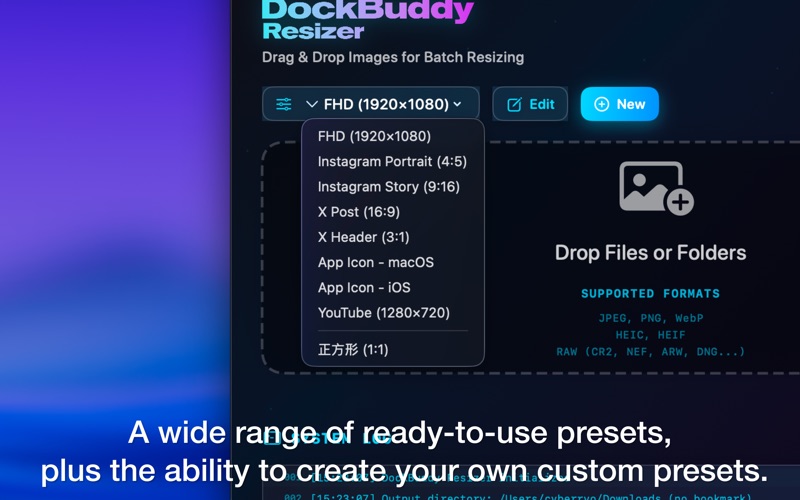
Built-in presets optimized for major social platforms:
- Instagram Post (1080×1350)
- Instagram Story (1080×1920)
- X/Twitter Post (1200×675)
- X/Twitter Header (1500×500)
- YouTube Thumbnail (1920×1080)
Automatically convert to the optimal size for each platform while maintaining aspect ratio.
### App Icon Generation
Generate all App Icon sizes at once:
- macOS icons (16px to 1024px)
- iOS icons (all required sizes)
Essential functionality for app developers.
### High-Quality Output
Support for JPEG, PNG, and HEIC formats. Fine-tune quality settings to achieve optimal file size while preserving image quality.
### Custom Presets
Save frequently used size settings as presets. Apply the same settings with one click next time.
### Resize Modes
- Long Edge: Apply specified size to the longer edge
- Short Edge: Apply specified size to the shorter edge
- Fit: Resize to fit within specified dimensions
- Fill: Crop to fill specified dimensions
## Perfect For
- Photographers posting to blogs and social media
- E-commerce shop owners processing product images
- App developers creating App Icons
- Designers optimizing images for websites
- Anyone looking to streamline photo organization
## Simple Workflow
1. Drag and drop images
2. Select a preset
3. Click "Start Resize"
Done in just 3 steps. No complicated settings required.