
iPhone Screenshots


Description
Launch Apps, Folders, and System Tools
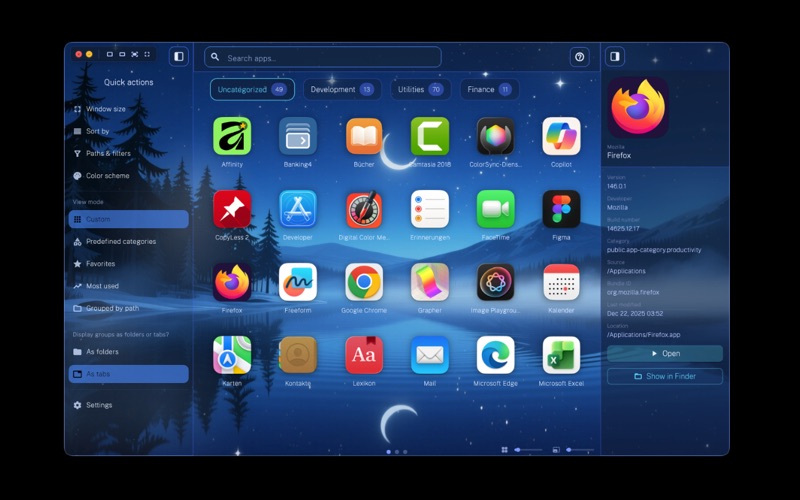
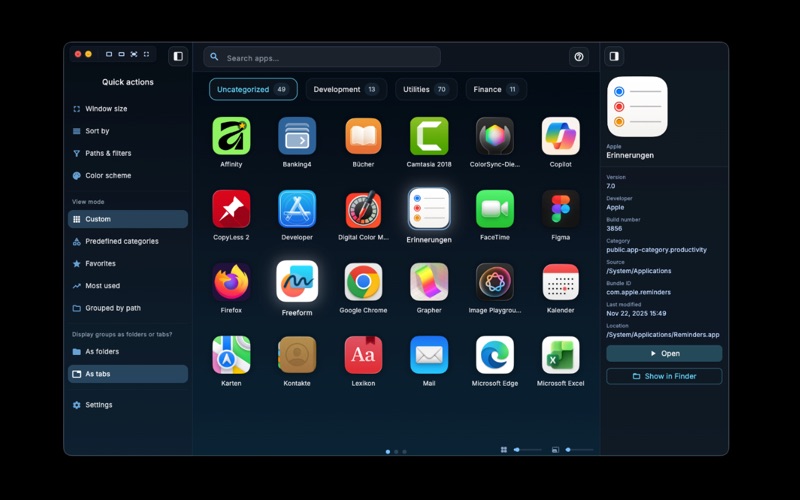
Open M-Launcher with a global hotkey and instantly access installed apps, folders, and system-wide locations. The launcher replaces traditional app grids with an enhanced overview including additional information.
Explorer Sidebar for Direct Access
The integrated Explorer sidebar provides quick access to:
Favorites
Recently used apps
System-wide folders and directories
App launching, navigation, and organization come together in one interface.
One Organization – Two Views
M-Launcher separates organization from presentation.
Switch between tab view and folder view at any time. All created tabs and folders remain intact and available in both views.
No need to rebuild your app structure when changing views.
Views and Sorting
Adapt the display to your workflow:
Five view modes
Manual sorting via drag & drop
Alphabetical A–Z sorting
Categories like favorites or frequently used apps
Even extensive app collections stay clearly organized.
Customizable Design
M-Launcher can be visually customized:
38 Themes
Variable sizes for icons and folders
Adjustable spacing in the app grid
Flexible window sizes
App Details in the Sidebar
The detail sidebar displays additional information including:
App version
File location
Additional app details
This information is available directly in the launcher.
Why M-Launcher?
App launcher for macOS with Explorer sidebar
Freely switchable tabs and folder views
Centralized management of apps and folders
Structured app overview as Launchpad alternative
M-Launcher is designed for users who want to organize, manage, and launch apps on Mac in a structured way.