
iPhone Screenshots


Description
Description
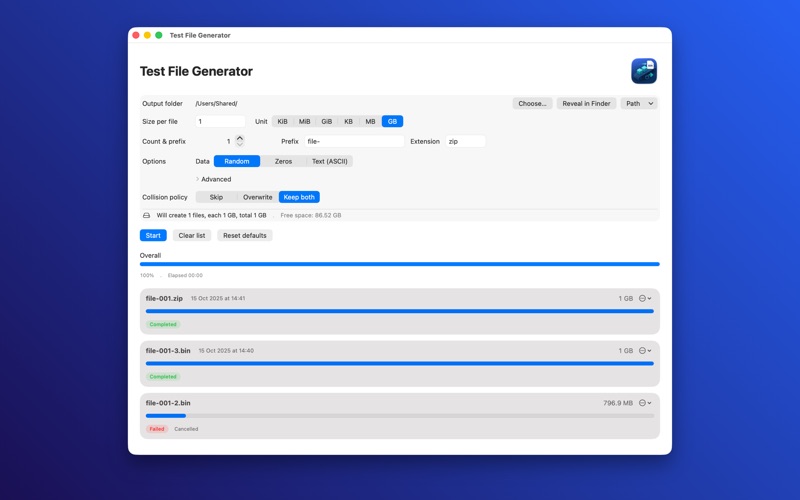
Need a quick, reliable way to test copy and transfer speeds? Test File Generator creates realistic test files—at the sizes, counts, and patterns you choose—so you can measure performance across SSDs, external drives, NAS, and network shares. Everything happens locally on your Mac for privacy and accuracy.
Why it’s great
Real-world results: Use incompressible random data to avoid “too good to be true” numbers.
Fast and simple: Pick a folder, set size and count, hit Start.
Safe by design: Free-space checks and collision policies prevent surprises.
Key features
Instant file creation: Set size per file (KiB/MiB/GiB or KB/MB/GB) and file count with a custom prefix.
Data patterns: Random (incompressible), Zeros, or Text (ASCII).
Presets & extensions: BIN, DAT, ZIP, PDF, JPG, PNG, TXT—change the extension or pick a preset.
Collision handling: Skip / Overwrite (with confirmation) / Keep both (adds “-2”, “-3”, …).
Free-space protection: Blocks start if the plan exceeds available space and clearly shows remaining space.
Overall progress & ETA: See elapsed time, average MiB/s, and estimated time to finish.
Results table: Newest-first history with status chips (Completed / Skipped / Failed), timestamps, file size, and per-row actions: Open in Finder, Copy Path, Reveal in Terminal, Remove from list.
Drag & drop: Drop a folder anywhere in the window to set the output location.
Advanced options: Preset, Signature, and Chunk size grouped in a tidy “Advanced” section.
Reset to defaults: One click restores sensible defaults.
Designed for Mac: SwiftUI UI with Light/Dark Mode and smooth accessibility.
On-device & private: No network, no accounts, no analytics—ever.
Localised help: Built-in Help with step-by-step guidance, localised into many languages.
Perfect for
Checking USB/Thunderbolt SSD performance
Benchmarking NAS or shared network folders
Validating backup/copy workflows
Testing throughput under realistic (non-compressible) loads
Accessibility & localization
VoiceOver labels, keyboard hints, and clear status text are provided. UI and Help are localised for multiple languages.
Notes
Some presets (ZIP, PDF, JPG, PNG) write a small header signature so files are recognizable for testing; they are not full, valid documents—by design for synthetic payloads.
Privacy
The app processes everything on your device and does not collect any data.