
iPhone Screenshots
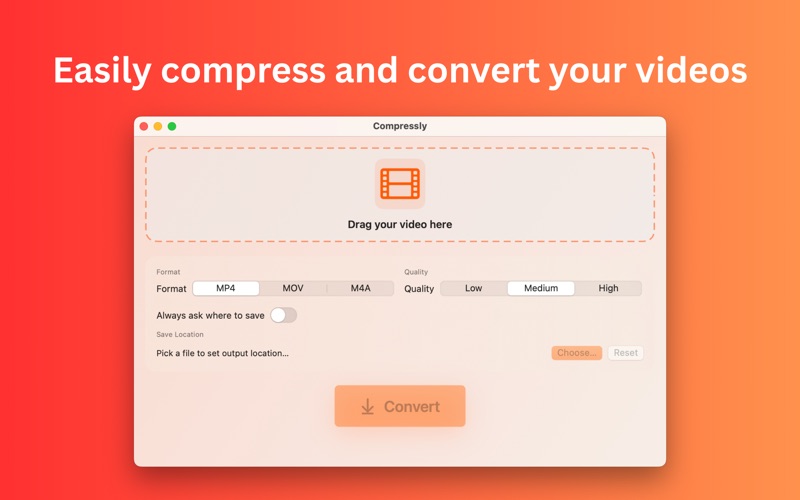


Description
Compressly is a clean, fast, and privacy‑friendly video converter and compressor for mac without requiring any internet connection. Drag in your videos, pick MP4 or MOV, choose a quality preset, and export smaller files without changing the original resolution. You can also extract audio to M4A with a single click.
Why creators choose Compressly:
- Drag & drop simplicity: Drop files anywhere in the window to start.
- Smart compression: Keeps original dimensions and reduces bitrate to shrink file size while preserving visual quality.
- Batch processing: Queue multiple videos, reorder, remove, and convert them all at once.
- Popular formats: Convert to MP4 or MOV, or extract audio to M4A.
- Quality presets: Low, Medium, High mapped to tuned bitrates for a great size/quality balance.
- Flexible saving: Auto‑save next to the source or choose a destination folder; remembers your choice securely (sandboxed bookmarks).
- Clear feedback: Live progress, cancel at any time, and Reveal in Finder when finished.
- Modern macOS design: SwiftUI interface with light/dark mode and a sleek neon orange accent.
- Private by design: All conversion happens on your Mac. No uploads, no trackers, no accounts and no need for an internet connection.
Features:
- Video conversion to MP4 and MOV (H.264)
- Audio extraction to M4A (AAC)
- Maintain original resolution; quality set by bitrate
- Multiple file queue with position numbers (…1, 2, 3)
- Save Panel or one‑click default output
- Finder reveal and system notification on completion
- Sandboxed with user‑selected read/write permissions
- Optimized for Apple silicon and Intel Macs
Use cases:
- Convert to smaller videos without losing resolution
- Convert camera footage to MP4
- Prepare clips for email, chat, social apps
- Extract audio (M4A) for podcasts, voice notes, and sound bites