
iPhone Screenshots


Description
ClipMaster is the ultimate clipboard manager for macOS that automatically saves everything you copy, and now syncs it across all your devices via iCloud.
**NEW IN 1.1: ICLOUD SYNC & FOLDERS**
• Sync your snippets and history across multiple Macs securely.
• Organize snippets into custom folders for better management.
• Pin important history items to keep them always accessible.
**KEY FEATURES**
• Automatic Clipboard History
Save every text you copy automatically. Access your complete clipboard history with a single click or global hotkey.
• iCloud Sync (Offline-First)
Sync your data securely using your private iCloud database. Works offline! Changes are saved locally and synced manually when you're ready via Settings.
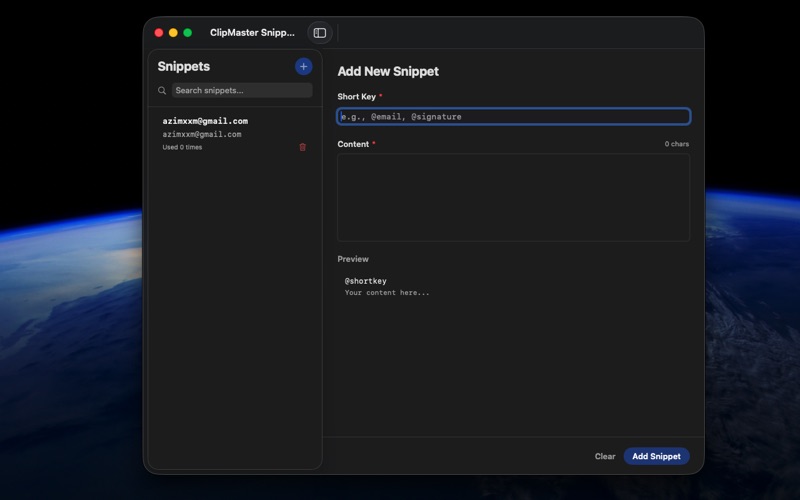
• Powerful Snippets & Folders
Create reusable text snippets for frequently used content like emails, code blocks, and addresses. Group them into colorful folders to stay organized.
• Pinned Items
Keep your most important copied items at the top of your list. Never lose that crucial link or phone number again.
• Global Keyboard Shortcuts
Access ClipMaster from any app:
⌃⌥⌘C - Toggle clipboard menu
⇧⌘V - Quick menu at cursor
⇧⌘S - Open snippets manager
⇧⌘F - Search history
• Privacy First
Your data is stored in YOUR private iCloud container. We have no access to your clipboard content.
• Native macOS Experience
Built with SwiftUI for optimal performance. Beautiful dark mode support. Minimal memory and CPU usage.
**PERFECT FOR**
• Developers sharing code snippets across machines
• Writers managing research notes
• Professionals needing consistent email templates everywhere
• Anyone who wants a synchronized clipboard history
**REQUIREMENTS**
• macOS 14.0 or later
• iCloud account enabled for sync features
• Accessibility permission for shortcuts
Download ClipMaster today and take your productivity to the next level!