
iPhone Screenshots


Description
MacroType is a powerful and easy-to-use Mac app that streamlines your workflow by expanding text snippets wherever you type.
Create and Manage Snippets
The app’s Snippet Editor is your central hub for creating and managing all your snippets. You can add new snippets with a single click, or delete old ones with a dedicated button. The editor provides a clean, focused interface, making it easy to see all your snippets in a single, searchable list. Each snippet can be given a descriptive title and a unique abbreviation.
Rich Text & Plain Text Support
MacroType supports both rich text and plain text snippets.
Rich Text: Go beyond plain text with full formatting control. The built-in rich text editor allows you to use bold, italics, and underlines; change font size and color; create bulleted or numbered lists; and even insert images and tables.
Plain Text: For simple text, code, or scripts, the plain text editor provides a clean, monospaced interface.
Dynamic Placeholders and Macros
Make your snippets smarter with dynamic content. MacroType supports:
Fill-in Fields: Use {{fillin}} for single-line text or {{fillin:multiline=true}} for multi-line fields. When you expand a snippet with these placeholders, a small window will appear, letting you fill in the details before pasting.
Popup Menus: Create dynamic dropdown menus with {{popup:Option1:Option2:Option3}}. When the snippet is expanded, you can choose from the options you defined.
Dynamic Macros: Automatically insert the current date and time with a variety of formatting options. For example, %{date:yyyy} for the current year or %{time:hh:mm:ss} for the current time. You can also perform simple date calculations with %{datecalc} to add or subtract years, months, or days from the current date.
Customizable Trigger
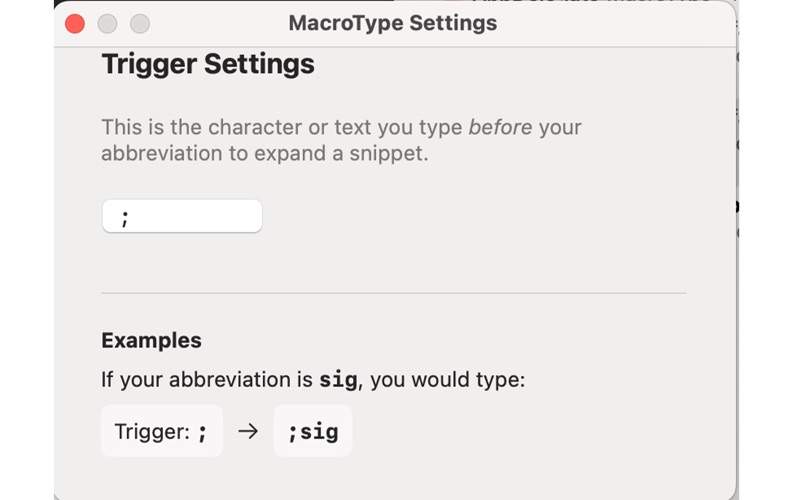
MacroType is designed to fit your personal typing style. You can customize the trigger character—the character you type before your abbreviation to expand a snippet. The default is a semicolon ;, so typing ;sig would expand a snippet for a signature. You can change this to any character you prefer, such as a comma , or a period ..
Privacy-Focused
Your data is safe and secure. MacroType does not collect, store, or transmit any of your personal information, usage data, or snippets. All your snippets and settings are stored locally on your Mac, ensuring your information remains privat