
iPhone Screenshots


Description
HexLauncher: Your macOS Start Button
New to macOS from Windows? Missing the familiar Start button? HexLauncher is your solution!
Launch your favourite macOS apps with style and speed using HexLauncher! Designed for productivity and customization, HexLauncher puts your most-used applications at your fingertips, right from the menu bar. Tailor the experience to your needs with flexible layouts, adjustable visuals, and easy app management.
Key Features:
- Flexible Layouts: Choose between a sleek List view for quick access or a customizable Grid view for a visual, organized display.
- Personalized Appearance: Fine-tune your launcher with adjustable font sizes for app titles, icon sizes, and grid dimensions to match your style.
- Show or Hide Titles: In Grid mode, toggle app titles on or off for a clean, icon-focused look.
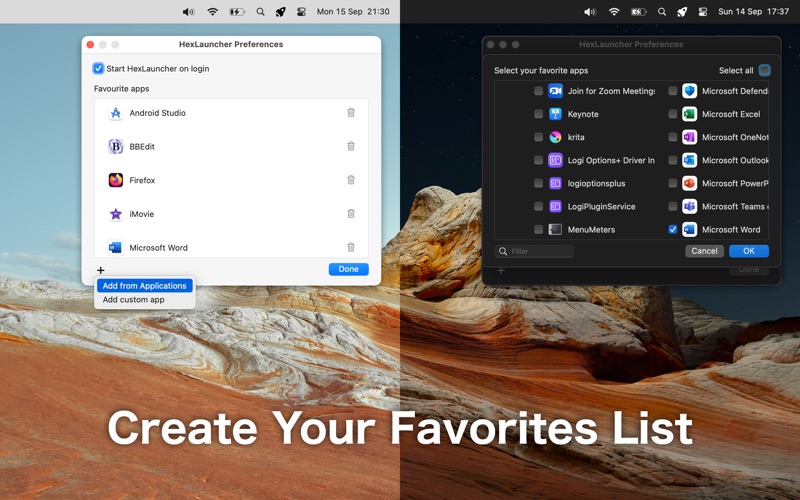
- Effortless App Management: Build your favorites list with ease:
- Add multiple apps at once from the `/Applications` folder.
- Add individual apps from any folder on your Mac.
- Menu Bar Convenience: Access your apps instantly from the macOS menu bar, keeping your workflow smooth and efficient.
- Launch at Login: Set HexLauncher to start automatically when you log in, so it’s always ready when you are.
- Light and Dark Mode Support: Seamlessly adapts to your macOS theme for a polished look.
Why HexLauncher?
Whether you're a power user or just want a faster way to open apps, HexLauncher combines simplicity with powerful customization. Organize your apps, tweak the layout, and launch with a single click — all tailored to how you work.
Get Started Today!
Download HexLauncher and take control of your macOS app experience. Boost your productivity and make your workflow uniquely yours!