
iPhone Screenshots

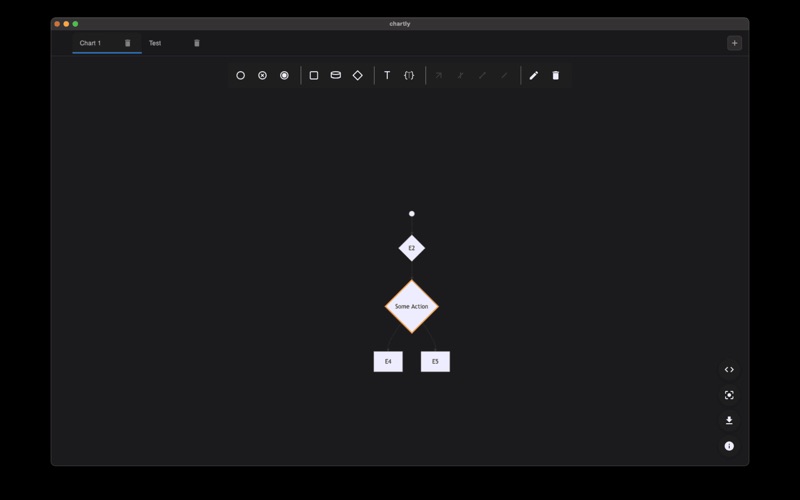

Description
ChartLy - Professional Flowchart Editor
ChartLy is a powerful, modern flowchart editor designed for developers, designers, and professionals who need to create clear, professional diagrams. Built with cutting-edge web technologies and packaged as a native macOS application, ChartLy combines the flexibility of web-based tools with the performance and integration of a desktop app.
Professional Flowchart Creation
Create sophisticated flowcharts with an intuitive visual interface that makes diagramming effortless. Whether you're mapping out software architecture, business processes, or technical workflows, ChartLy provides the tools you need to bring your ideas to life.
Mermaid.js Integration
ChartLy fully integrates with Mermaid.js, the industry-standard diagramming library used by developers worldwide. Write Mermaid syntax in the built-in code editor and see your diagrams render instantly in the preview pane. Perfect for developers who prefer code-based diagramming or need to version-control their diagrams alongside their code.
Multiple Tabs & Workspace Management
Work on multiple flowcharts simultaneously with our tabbed interface. Each tab maintains its own state, allowing you to switch between projects seamlessly. Perfect for developers working on multiple system designs or designers managing various client projects.
Real-Time Preview & Live Editing
Experience true WYSIWYG editing with instant preview updates. As you modify your Mermaid code or make visual changes, see the results immediately. No more waiting for renders or switching between edit and preview modes.
Comprehensive Toolbar & Elements
Access a full suite of flowchart elements including start/end nodes, standard process nodes, database nodes, junction points, text elements, comments, and various connection types (arrows, bidirectional, lines, cross edges).
Professional Dark Theme
ChartLy features a carefully crafted dark theme optimized for extended editing sessions. The high-contrast design reduces eye strain and provides a professional appearance that matches modern development environments.
Pan & Zoom Navigation
Navigate large, complex diagrams with intuitive pan and zoom controls. Zoom in to focus on specific sections or zoom out to get the full picture. Perfect for detailed technical diagrams that span multiple screens.
Smart Data Management
Your work is automatically saved to local storage, ensuring you never lose your progress. The app remembers your layout preferences and tab configurations, providing a consistent experience across sessions.
Export & Sharing
Export your completed flowcharts as high-quality PNG images for presentations, documentation, or sharing with team members. The export functionality maintains the visual quality and clarity of your diagrams.
Perfect For:
Software developers creating system architecture diagrams
DevOps engineers mapping deployment processes
Business analysts documenting workflows
Technical writers creating documentation
Privacy & Security
ChartLy runs entirely on your local machine. Your diagrams and data never leave your computer, ensuring complete privacy and security for sensitive business or technical information.
Native macOS Experience
Built with Tauri, ChartLy provides a true native macOS experience with proper window management, system integration, and performance optimization. Enjoy the benefits of a web-based tool with the reliability and performance of a native application.
Transform your ideas into clear, professional flowcharts with ChartLy. Whether you're documenting complex systems, planning business processes, or creating technical diagrams, ChartLy provides the tools and interface you need to succeed.
Download ChartLy today and experience the future of flowchart creation on macOS.