
iPhone Screenshots



Description
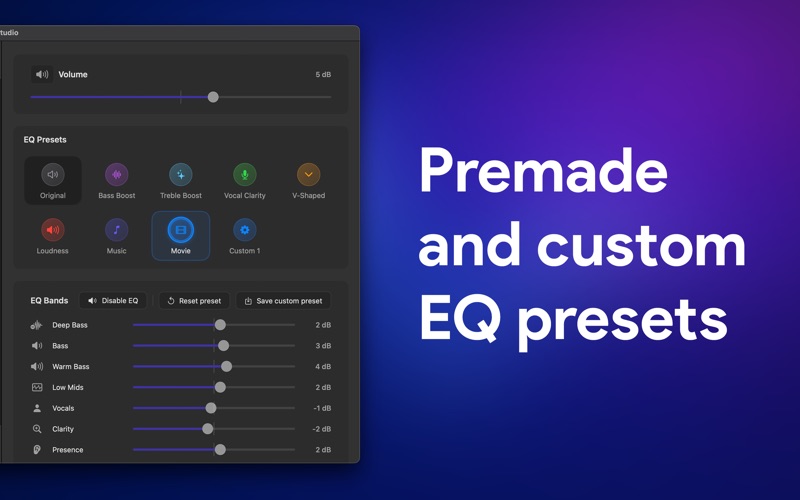
Edit videos and audio files by adjusting an 8-band or selecting presets. Modify sub bass, bass, midrange, and other frequency bands. Save custom presets and bypass effects. Export with original video quality and modified audio track.
EQ Studio makes your videos and audio sound better in seconds. Open a video or audio file, adjust the 8‑band equalizer (or pick a preset), and export — the app keeps the original video quality while replacing only the audio track with your EQ’d sound.
- Powerful 8‑band EQ: Sub Bass, Bass, Upper Bass, Low Mids, Midrange, Upper Mids, Presence, Brilliance
- Presets: Original, Bass Boost, Treble Boost, Vocal Clarity, V‑Shaped, Loudness, Music, Movie — plus save your own
- Master controls: Bypass, Mute, and precise Master Gain
- Clean, Mac‑native UI with responsive controls and a tasteful audio visualization for audio‑only files
- Smart exporting: Preserves original video track; writes a new high‑quality audio track for reliable playback
- Save anywhere and reveal the finished file in Finder
- All audio processing happens on your Mac. No sign‑in, no cloud processing.
Key Features
- 8‑band equalizer tuned for real‑world results
- One‑click presets and custom preset saving
- Bypass, Mute, and Master Gain for quick A/B checks
- Fast, reliable export with preserved video quality
- Designed for macOS with a simple, distraction‑free interface
Supported Input Formats
- Video: MP4, MOV, M4V
- Audio: M4A, MP3, WAV, AIFF/AIF, CAF, AAC
Export Formats
- Video: MP4, MOV, M4V (original video quality preserved; EQ applied to audio)
- Audio: M4A (AAC), WAV, AIFF, CAF
Note: When a requested audio format isn’t natively available, the app exports to a compatible high‑quality format automatically.