
iPhone Screenshots


Description
A comprehensive macOS application manager that provides advanced application discovery, management, and quick launch capabilities. Built with SwiftUI and designed for modern macOS systems.
Features
Application Discovery & Management
- Comprehensive App Scanning: Automatically discovers applications from multiple system directories
- Smart Filtering: Intelligent filtering to exclude system utilities and non-launchable applications
- Real-time Updates: Monitors for newly installed applications and updates the list automatically
Quick Launch System
- Global Hotkey Support: Press `⌘+Space` to instantly open the Quick Launch interface
- Fuzzy Search: Real-time search with intelligent matching of application names and bundle identifiers
- Keyboard Navigation: Full keyboard support for quick application selection and launching
- Overlay Interface: Elegant overlay design that doesn't interfere with other applications
Advanced Organization
- Multiple View Modes: Grid and list views for different preferences
- Smart Categorization: Automatic categorization of applications by type and vendor
- Favorites System: Mark and quickly access your most-used applications
- Running Apps Detection: Real-time detection and display of currently running applications
- Recently Used Tracking: Automatic tracking of recently launched applications
Customizable Interface
- Theme System: 11 different theme colors including default, blue, green, orange, red, purple, pink, yellow, mint, indigo, and teal
- Responsive Design: Adapts to different window sizes and screen resolutions
- Modern UI: Built with SwiftUI for a native macOS experience
- Accessibility Support: Full VoiceOver and accessibility compliance
Advanced Features
- Application Details: Comprehensive information display including version, bundle ID, path, and modification time
- Direct Launch: Launch applications directly from the interface
- Finder Integration: Reveal applications in Finder with one click
- Blocked Apps Management: Exclude unwanted applications from the list
- Vendor Filtering: Filter applications by developer/vendor
- Category Filtering: Filter by application categories (Productivity, Developer Tools, Entertainment, etc.)
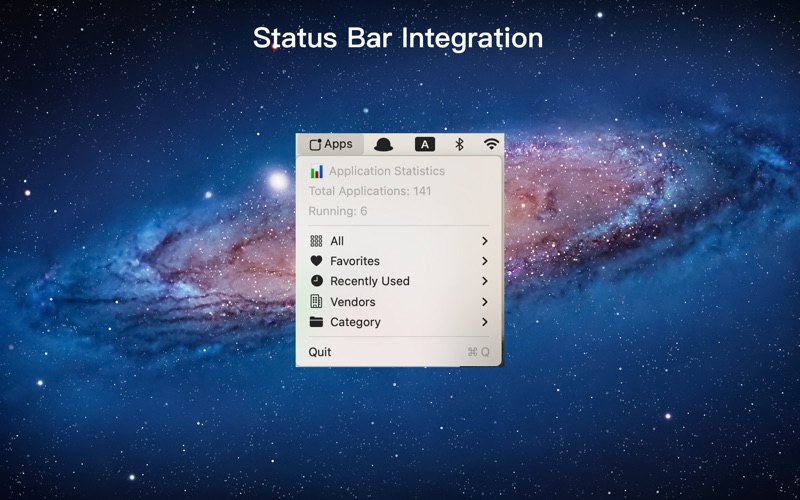
Status Bar Integration
- Menu Bar App: Runs as a menu bar application with full system integration
- Quick Access: Access all features directly from the menu bar
- Statistics Display: Real-time display of total applications and running apps count
- Category Navigation: Quick category switching from the menu bar