
iPhone Screenshots



Description
Are you tired of manually typing text from images, handwritten notes, and scanned documents? Frustrated by inaccurate built-in recognition that destroys formatting?
Capture a screenshot to instantly extract text. Results are automatically copied to your clipboard and ready to paste wherever you need them. The transparent, intuitive design makes extracting text feel as natural as copying regular text.
It features keyboard shortcuts, multilingual recognition, automatic text segmentation, and search and translation capabilities for your results.
Recognition happens silently in the background—fast, quiet, and unobtrusive—so you can focus on what matters most. The best tools should be invisible, there when you need them and gone without a trace when you don't. This is our design philosophy.
Key features
- Accurate text recognition with intelligent segmentation: Get precise results with smart paragraph organization.
- Lightning-fast processing: Recognition completes in under a second with no waiting
- Privacy-focused design: Runs locally without an internet connection or data collection
- Quiet and unobtrusive operation: Works seamlessly without interrupting your workflow
- Minimalist interface: Advanced technology wrapped in intuitive, clean interactions
Complete Functionality
- Screenshot-based text recognition with direct clipboard integration—Paste results anywhere you need them.
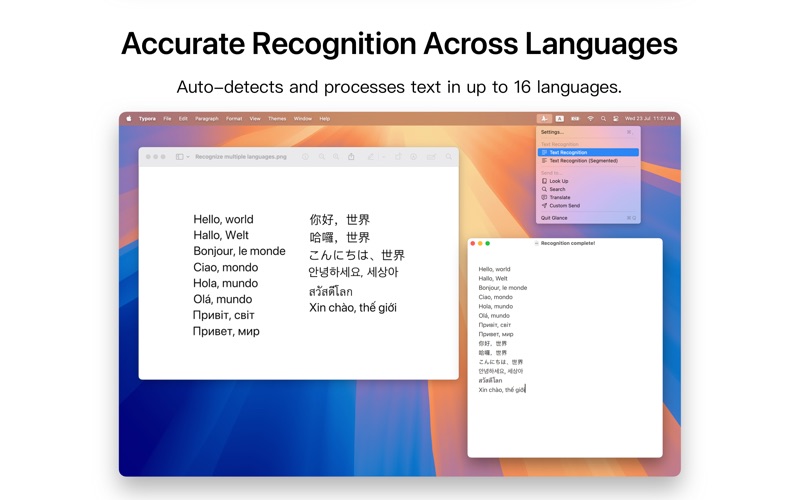
- Automatic language detection with simultaneous multilingual recognition. Specify target languages for improved accuracy when needed.
- Supported languages: Simplified Chinese, English (US), Traditional Chinese, Japanese, French, German, Italian, Spanish, Korean, Brazilian Portuguese, Cantonese (Simplified), Cantonese (Traditional), Thai, Vietnamese, Ukrainian, and Russian.
- Intelligent text segmentation: Understands document structure to organize long text into logical paragraphs with customizable text block connection options
- Integrated search and translation: Look up, search online, or translate recognition results instantly. Customize any search engine or translation platform by appending clipboard text to specified links or URL schemes.
- Automatic text correction: Built-in error correction with customizable correction dictionaries
- Full keyboard shortcut support: Every function is accessible via customizable hotkeys.
Note: Supported languages and accuracy may vary depending on your operating system version.