
Spatial Dock - App Switcher
Services et conseils Wesley Bouarab Inc
iPhone Screenshots



Description
Switch between apps intuitively, position them in space and access them with simple keyboard shortcuts.
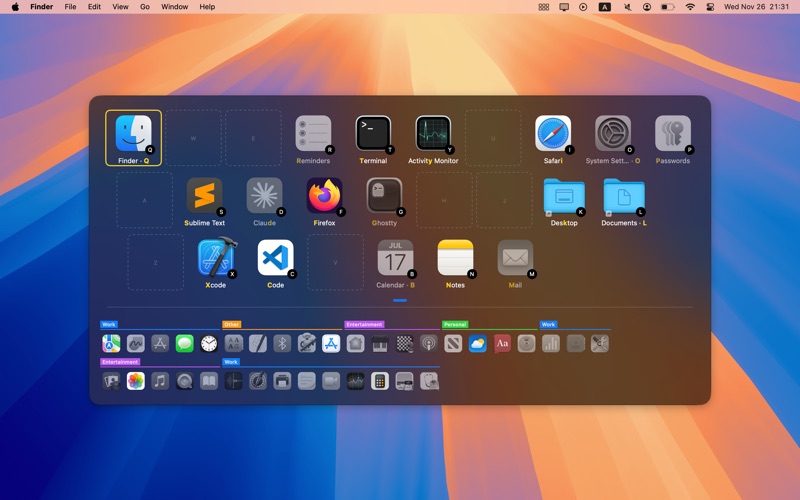
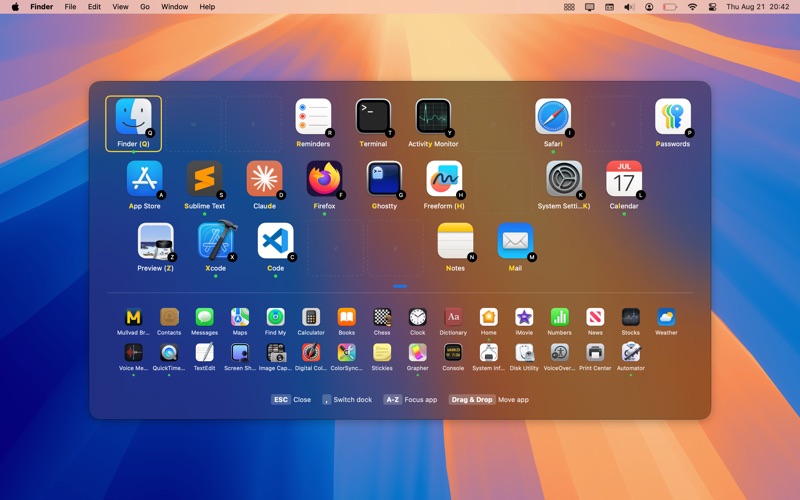
SpatialDock is a macOS app switcher that maintains fixed app positions, enabling muscle memory-based navigation through keyboard shortcuts. Unlike Cmd+Tab and Mission Control that constantly reorganize your apps, SpatialDock keeps every app in the same position, allowing your spatial memory and muscle memory to take over.
HOW IT WORKS
• Fixed Spatial Positioning: Each app maintains its exact position in a grid across all sessions. After a few uses, you can locate apps without visual searching, reducing cognitive load during app switching.
• Keyboard-Mapped Grid: The apps grid matches your keyboard layout, providing spatial positioning on your physical keyboard. This creates muscle memory for direct keyboard access.
• Instant Switching: Hold Right Command (or any modifier) and press a letter key to switch directly to that app. No visual scanning required.
KEY FEATURES
• Primary & Secondary Docks: Primary dock for keyboard-shortcut apps; secondary dock for all other running apps with multi-row support
• Multiple Activation Methods: Modifier key hold, modifier + trigger key combos, or Alt+Tab mode
• Direct Navigation: Press letter keys, click icons, use Tab for recent apps, or arrow keys for spatial navigation
• Smart App Behavior: Configure window forwarding, hide-others mode, and toggle-focus per app or globally
• Links & URLs: Add shortcuts to files, folders, websites, and custom URL schemes (deeplinks)
• Custom Keyboard Layouts: Full support for Colemak, Dvorak, split keyboards, and ergonomic layouts
• Multi-Screen Support: Choose where SpatialDock appears across multiple displays
• Visual Customization: Light/dark themes, custom icons, app labels, selection colors, and more
• Fast & Efficient: Fast activation with minimal resource usage
• Private: No data collection, no network traffic, no special permissions required, runs in macOS Sandbox