
iPhone Screenshots


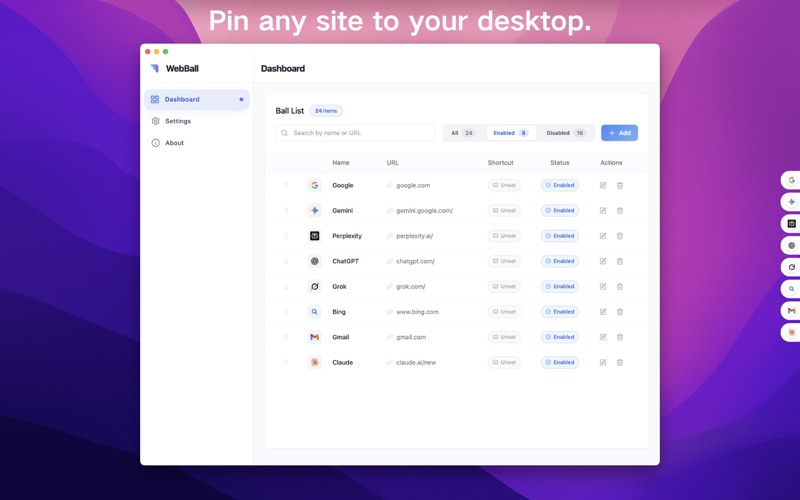

Description
Reshape Your Web Experience
1. The Smart Floating Dock & Sidebar
Anything-as-an-App: Turn any website—like Notion, YouTube, or Slack—into a persistent application on your desktop.
Elegant Edge Snapping: Automatically docks to the edge of your screen, saving precious space on your main Dock.
Intelligent Auto-Hide: Gently hover to reveal. It silently gets out of your way, giving you back a clean, focused workspace.
2. A Private & Focused Browsing Experience
The Multi-Account Powerhouse: Tired of ChatGPT limits or logging in and out of multiple Google accounts? WebBall's container technology lets you log into several accounts simultaneously. Switch between them with a single click, completely isolated from one another.
3. A Lightning-Fast Workflow
Global Hotkeys: Assign custom keyboard shortcuts to your most-used web apps and launch them from anywhere on your Mac.
Immersive Focus: Windows automatically hide when they lose focus, letting you concentrate fully on your current task. Experience true, seamless context switching.
Who is WebBall For? Built for People Who Value Efficiency.
For AI Power Users & AIGC Creators
Break Through Limits: Log into multiple ChatGPT, Claude, or Google Gemini accounts at once. Effortlessly bypass free-tier limits or compare models side-by-side.
Build Your AI Workbench: Consolidate tools like Notion AI, Gamma, and Tome into a single, powerful AI assistant dashboard.
For Business Professionals & Executives
Stay on Top of Everything: Keep your Gmail, Slack, and Microsoft Teams at your fingertips. Respond to messages and manage tasks without juggling browser tabs.
Monitor Your KPIs: Pin project management tools (like Jira, Trello, Asana) and data dashboards to your sidebar for a constant, clear overview.
For Developers & Engineers
Code Faster: Dock GitHub, Stack Overflow, or your server monitoring pages. Look up documentation or check build statuses without ever leaving your editor's context.
For Designers & Creatives
Your Permanent Moodboard: Keep Pinterest and Dribbble docked as a persistent source of inspiration. Place collaboration tools like Figma right beside your design canvas for real-time team sync.
For Students & Researchers
Accelerate Your Research: Pin your online courses, Zotero, Google Scholar, and Wikipedia. Find and reference materials in a fraction of the time while writing your next paper.