
iPhone Screenshots



Description
Enhances by explaining concepts, summarizing content, rewriting for clarity, and improving through custom prompts. Integrates with macOS apps via Services for seamless processing.
AI Text Assistant brings powerful AI text processing directly into your macOS workflow via native Services.
How it works
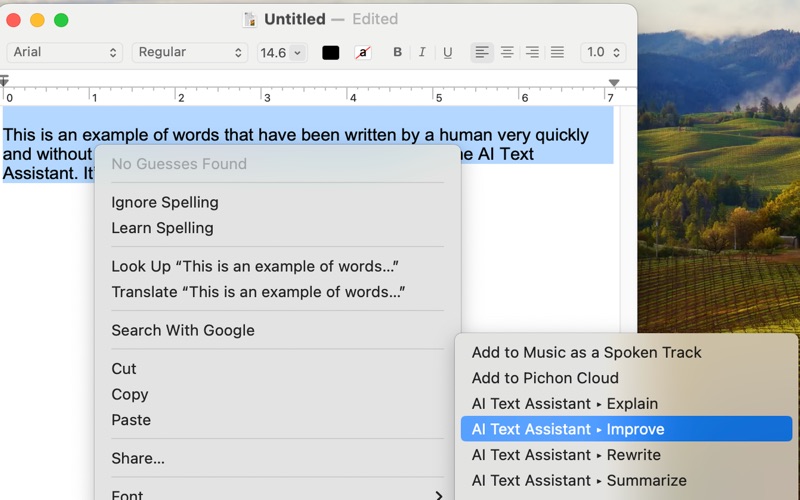
Select text → Right-click → Choose "AI Text Assistant" → Get instant AI enhancement
AI Actions (prompts are editable)
Explain – Break down complex topics clearly
Summarize – Extract key points
Rewrite – Improve clarity and flow
Improve – Enhance text via custom prompt
Works with most apps
Text editors, browsers, productivity and web apps, messaging platforms… wherever you can select text
Privacy-first
You provide your OpenAI API key
No data is collected
All requests go directly from Mac to OpenAI
Flexible Plans
Free Tier
Includes all AI actions
Requires your own API key
Great for trying it out (usage limits apply)
BYOK Premium
Unlimited AI use
Advanced prompt customization
Requires your API key
Key Benefits
Native integration – no copy/paste needed
Universal compatibility – works across most Mac apps
Customizable – tailor prompts to your needs
Cost-effective – use your own OpenAI key
Privacy-focused – your data stays private
Perfect for
Writers, content creators, students, researchers, business professionals… anyone working with text on Mac
Requirements
macOS 13 or later
OpenAI API key (get yours at platform.openai.com)
Compatible with apps that support text selection
Note: Some apps disable right-click menus or use custom UIs. AI Text Assistant works by default in the vast majority of Mac apps.
Legal Information
Privacy Policy: https://www.aporias.com/ai-text-assistant-for-macos/ai-text-assistant-privacy-policy/
Terms of Use: https://www.aporias.com/ai-text-assistant-terms-of-use/